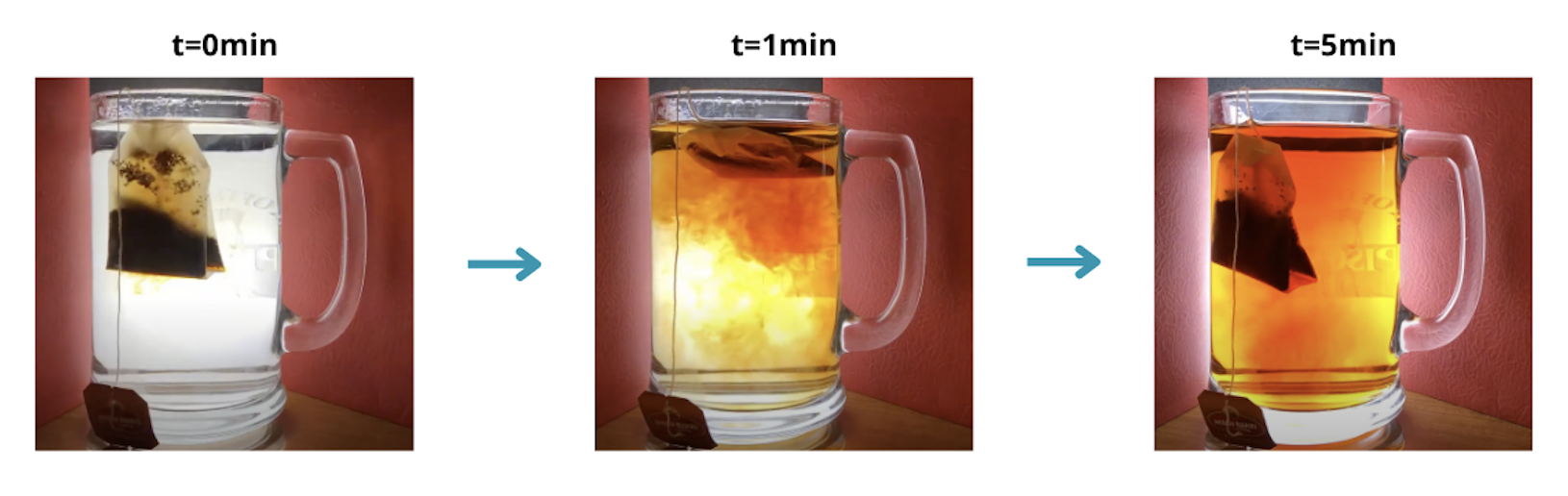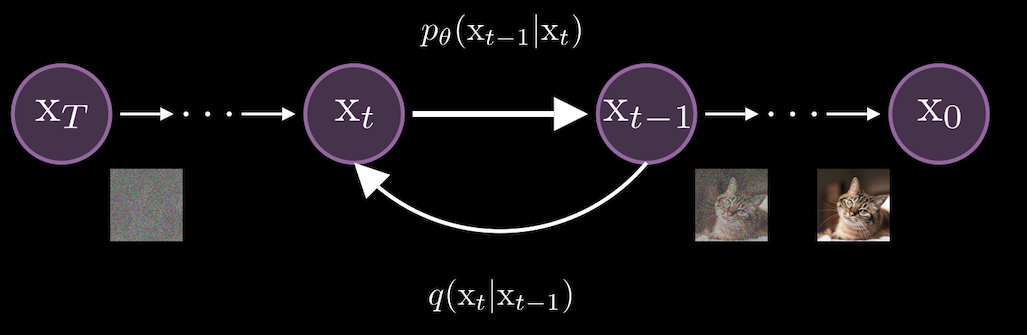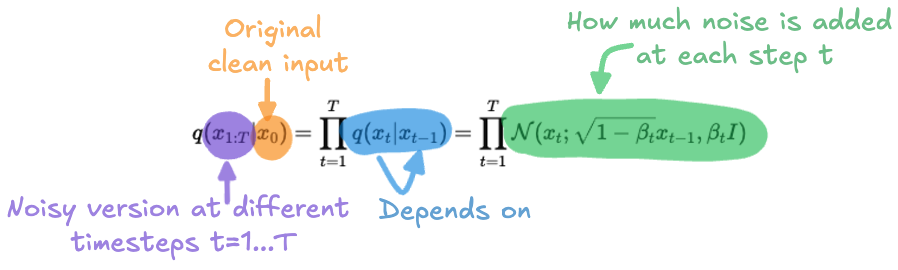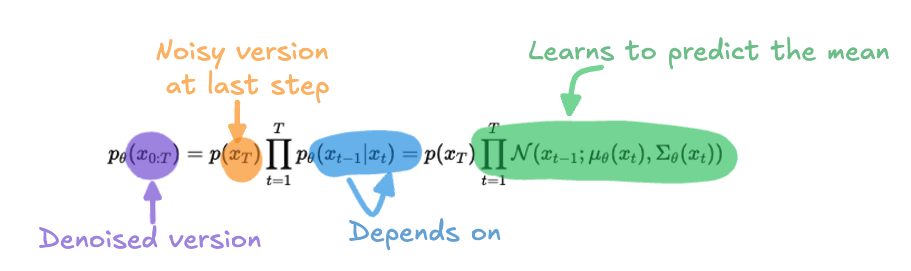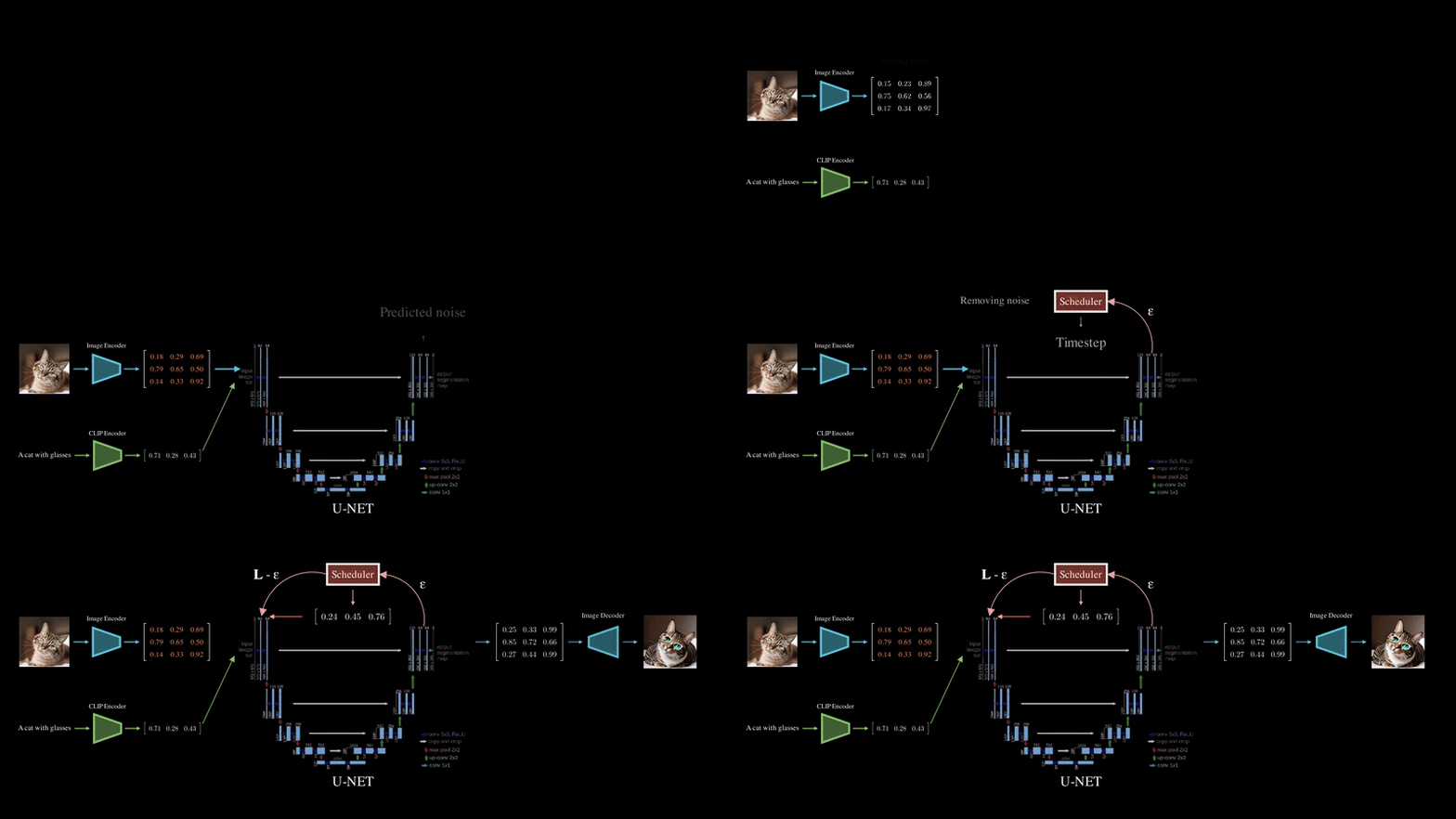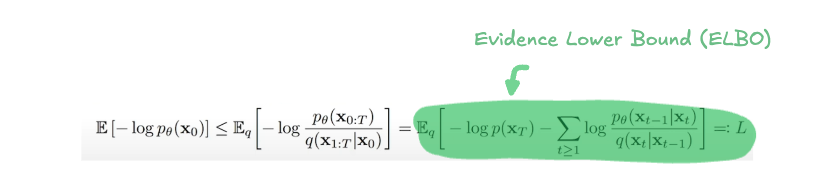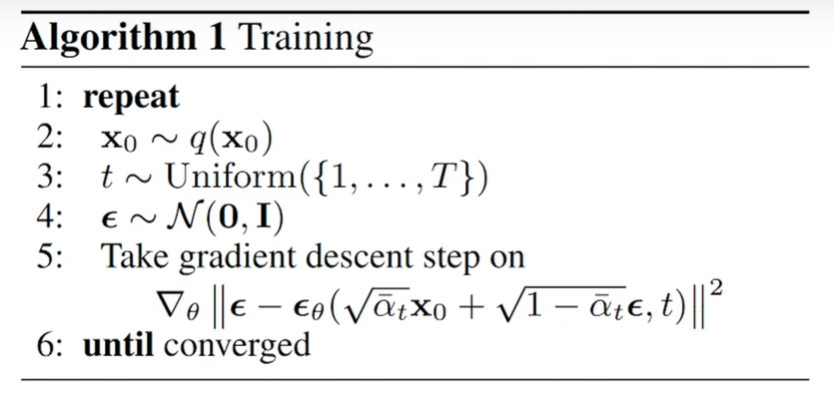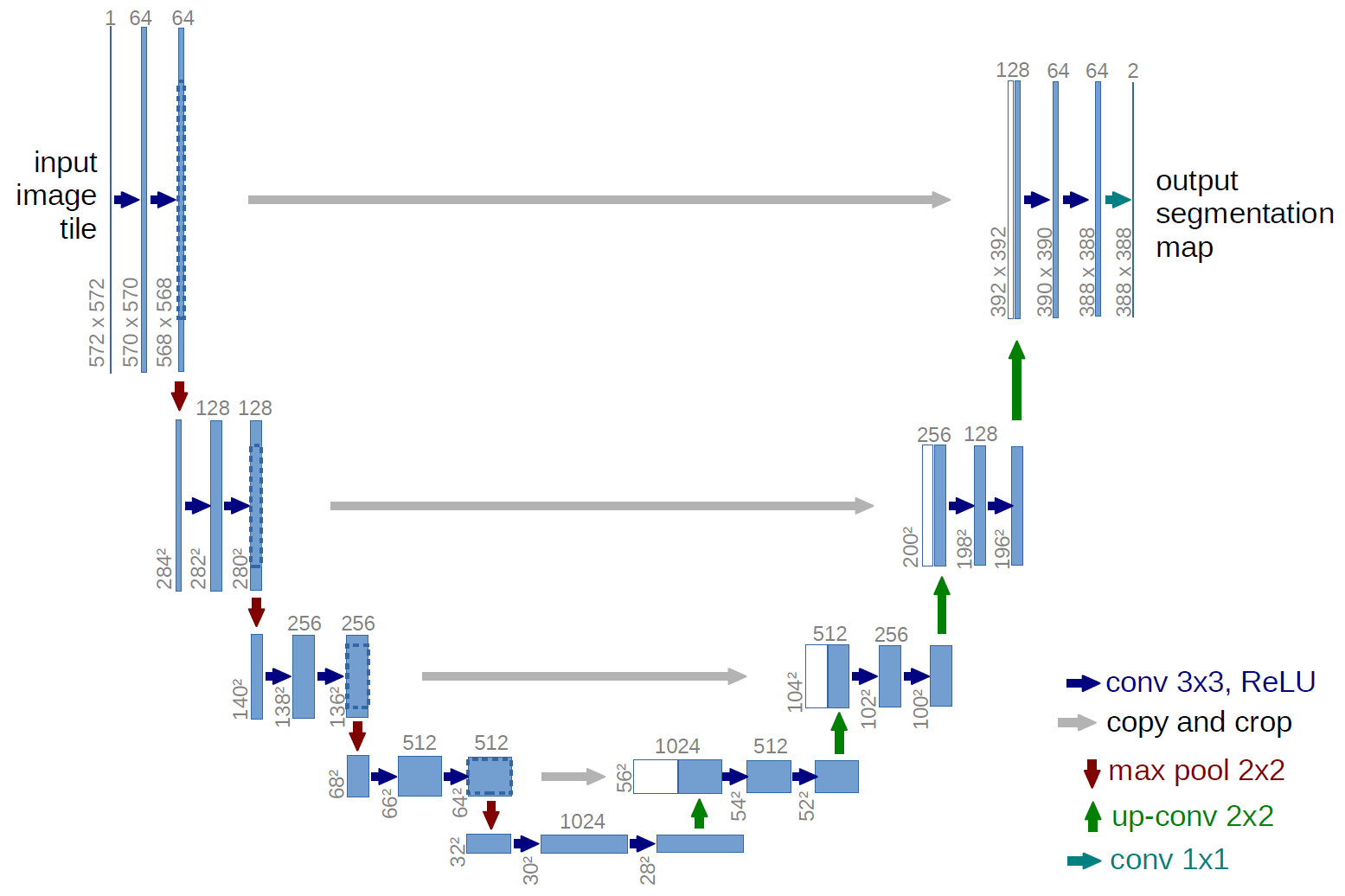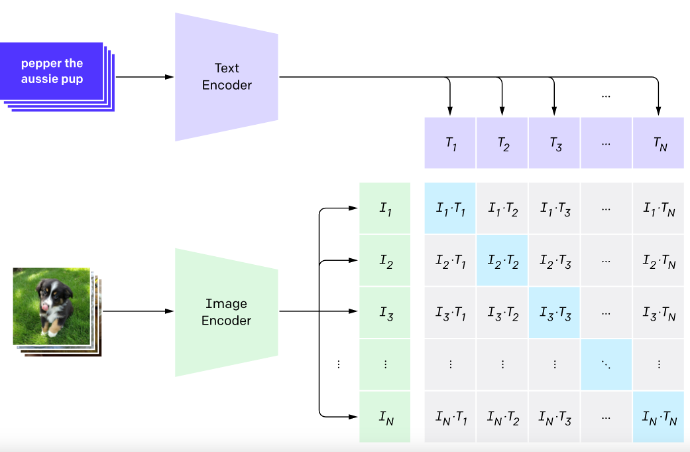
<?xml version="1.0" encoding="utf-8"?><feed xmlns="http://www.w3.org/2005/Atom" xml:lang="en"><generator uri="https://jekyllrb.com/" version="4.4.1">Jekyll</generator><link href="https://khalafaoui.com/feed.xml" rel="self" type="application/atom+xml"/><link href="https://khalafaoui.com/" rel="alternate" type="text/html" hreflang="en"/><updated>2026-10-29T15:55:08+00:00</updated><id>https://khalafaoui.com/feed.xml</id><title type="html">blank</title><subtitle>Yasser Khalafaoui, PhD. AI researcher working on LLM safety and hallucination mitigation, writing about generative models. </subtitle><entry><title type="html">Diffusion, Classifier-Free Guidance, UNet and CLIP</title><link href="https://khalafaoui.com/blog/2025/stable-diffusion/" rel="alternate" type="text/html" title="Diffusion, Classifier-Free Guidance, UNet and CLIP"/><published>2025-01-12T12:00:00+00:00</published><updated>2025-01-12T12:00:00+00:00</updated><id>https://khalafaoui.com/blog/2025/stable-diffusion</id><content type="html" xml:base="https://khalafaoui.com/blog/2025/stable-diffusion/"><![CDATA[<div class="row mt-3"> <div class="col-sm mt-3 mt-md-0"> <figure> <picture> <img src="/assets/img/sd_image.png" class="img-fluid rounded z-depth-1" width="100%" height="auto" loading="lazy" onerror="this.onerror=null; document.querySelectorAll('.responsive-img-srcset').forEach(function (n) { n.remove(); });"/> </picture> </figure> </div> </div> <h1 id="introduction-to-generative-models">Introduction to generative models</h1> <p>Generative models have become a cornerstone of modern machine learning, giving us the ability to create new data instances that resemble those found in training sets. <a href="../../2025/vae">In our previous discussions on VAEs</a>, we’ve already touched upon the concept of generative models. VAEs allow us to sample new data points from a learned latent space, producing outputs like images that feel familiar yet are entirely new.</p> <p>At their core, generative models aim to model the distribution of the data itself. Given some input data, the goal is to learn a probability distribution that can then be sampled to produce new, unseen examples. For instance, given a set of images, a generative model can learn the characteristics of these images and then generate new ones that could plausibly belong to the same set.</p> <p>These models have a wide range of applications, from generating realistic images, music, and text, to solving more complex problems like filling in missing parts of data, upscaling images, or even designing new molecules in drug discovery.</p> <p>As we dive deeper into this blog, we’ll explore a particularly exciting class of generative models — diffusion models — which are the core of the stable diffusion solution and uncover how they’re used to create impressive visual outputs</p> <h1 id="enters-diffusion-models">Enters diffusion models</h1> <p>Diffusion models have emerged as a groundbreaking innovation in generative AI, with applications ranging from image generation to audio synthesis. These models gained widespread attention in 2022, powering well-known tools like DALL·E 2 and Google’s Imagen, reshaping the landscape of creative AI.</p> <p>At their core, diffusion models borrow inspiration from non-equilibrium thermodynamics, particularly the concept of diffusion. But don’t worry — we’re not here to dive into a physics lecture! However, understanding the analogy helps clarify how these models work. Think of it like this: when you drop a tea bag into a cup of hot water, the tea’s molecules diffuse from an area of high concentration (the tea bag) into the water, gradually spreading and changing the color of the water. This diffusion process eventually leads to an equilibrium state, where the tea is evenly distributed throughout the water.</p> <div class="row mt-3"> <div class="col-sm mt-3 mt-md-0"> <figure> <picture> <img src="/assets/img/diffusion_teabag.png" class="img-fluid rounded z-depth-1" width="100%" height="auto" loading="lazy" onerror="this.onerror=null; document.querySelectorAll('.responsive-img-srcset').forEach(function (n) { n.remove(); });"/> </picture> </figure> </div> </div> <div class="caption"> Visual representation of the diffusion process of a tea bag. In physics, it is not possible to reverse this process. </div> <p>Now, in the case of diffusion models, the idea is similar but applied to data like images or audio. The “information” at the start — think of a crisp image or a clean sound sample — undergoes a forward process where noise is gradually added, akin to the tea molecules spreading into the water. As this process continues, the input data becomes increasingly noisy, losing more and more of its recognizable features.</p> <p>The magic of diffusion models lies in their ability to reverse this process. Just as it would be impossible to “undo” the tea diffusion in water, these models aim to reverse the diffusion process in data. By learning how to add and remove noise at each step, diffusion models can generate new, high-quality samples from a noisy starting point, whether it’s reconstructing an image or generating entirely new content.</p> <p>In technical terms, diffusion models work by gradually adding noise to data in a series of steps, modeled by a process called a <strong>Markov chain</strong>. At each step, a small amount of noise is applied to the input, moving from a clear image, or data point, to a fully noisy version. This is known as the <strong>forward process</strong> and is represented as \(q(x_t∣x_{t−1})\), where each step \(t\) depends on the previous step \(t−1\).</p> <p>The goal during training is to learn the reverse process, \(p_\theta(x_{t−1}∣x_t)\), which gradually removes the noise added in the forward steps.</p> <div class="row mt-3"> <div class="col-sm mt-3 mt-md-0"> <figure> <picture> <img src="/assets/img/markov_chain.png" class="img-fluid rounded z-depth-1" width="100%" height="auto" loading="lazy" onerror="this.onerror=null; document.querySelectorAll('.responsive-img-srcset').forEach(function (n) { n.remove(); });"/> </picture> </figure> </div> </div> <div class="caption"> Markov chain process in a diffusion model. The forward process adds noise to a clean input, while the reverse process learns to predict noise and remove it. </div> <h1 id="equations-a-lot-of-equations">Equations… A lot of Equations!</h1> <p>Now, let’s dive into the mathematics. Don’t worry if the equations seem complex at first—grasping the intuition behind them will make things much easier to follow.</p> <p>First, we define the forward process, where noise is progressively added to the input data:</p> <div class="row mt-3"> <div class="col-sm mt-3 mt-md-0"> <figure> <picture> <img src="/assets/img/forward_formula.png" class="img-fluid rounded z-depth-1" width="100%" height="auto" loading="lazy" onerror="this.onerror=null; document.querySelectorAll('.responsive-img-srcset').forEach(function (n) { n.remove(); });"/> </picture> </figure> </div> </div> <p>Now, the goal of the reverse process is to undo this destruction, starting from noise and gradually “denoising” the data to recover the original clean image:</p> <div class="row mt-3"> <div class="col-sm mt-3 mt-md-0"> <figure> <picture> <img src="/assets/img/backward_formula.png" class="img-fluid rounded z-depth-1" width="100%" height="auto" loading="lazy" onerror="this.onerror=null; document.querySelectorAll('.responsive-img-srcset').forEach(function (n) { n.remove(); });"/> </picture> </figure> </div> </div> <p>The reverse process learns to predict \(x_{t−1}\) based on \(x_t\). Instead of explicitly specifying the mean and variance, the model is trained to predict the mean \(\mu_\theta(x_t)\), which helps recover the denoised version of the data at each step. The variance \(\Sigma_\theta(x_t)\) is typically fixed to simplify the computation, as it’s assumed to follow a Gaussian distribution.</p> <div class="row mt-3"> <div class="col-sm mt-3 mt-md-0"> <figure> <picture> <img src="/assets/img/sd_overview.gif" class="img-fluid rounded z-depth-1" width="100%" height="auto" loading="lazy" onerror="this.onerror=null; document.querySelectorAll('.responsive-img-srcset').forEach(function (n) { n.remove(); });"/> </picture> </figure> </div> </div> <div class="caption"> Stable Diffusion pipeline. Both the image and the conditioning text are transformed into embeddings. Noise is added to the input image. Then the text embedding, noisy image and timestep are passed as inputs to the UNET architecture which role is to predict how much noise was added. The predicted noise is removed gradually at each time step. Finally, the image is sent to the decoder to reconstruct the image. </div> <p>Visualizing this pipeline, you might be wondering how the model generates an image when you only provide a text prompt, as seen in various applications. In this scenario, the process starts with an image—but not just any image. It’s pure noise, essentially a canvas of random pixels. The model then refines this noisy image step by step, guided entirely by the text prompt you provide. This technique, known as classifier-free guidance, ensures that the generated image aligns closely with the meaning and context of the text. We’ll dive deeper into how this guidance works shortly.</p> <p>Going back now to the maths behind diffusion models. As seen previously, these models have two steps: a forward process and a backward process. The goal of training a diffusion model is to find the reverse Markov transitions that maximize the likelihood of the training data. In other words, the model learns to predict the noise that was added to \(x_{t-1}\) to turn it into \(x_t\). The objective is to make the predicted noise as close as possible to the real noise added. More generally, training is achieved by optimizing <strong>the variational bound on the negative log-likelihood (NLL)</strong>.</p> <p>This might look complex at first glance, but let’s break it down step-by-step. The model’s goal is to learn the parameters required to reverse the noise-adding Markov process. Ideally, we would maximize the likelihood of the true distribution over our dataset, \(\log p_\theta(x_0)\). However, directly maximizing this likelihood is practically infeasible due to the high computational cost involved. This is what we call <strong>an intractable problem</strong>.</p> <p>To make this optimization feasible, we instead find a lower bound to this likelihood and maximize it. Maximizing this lower bound indirectly maximizes \(\log p_\theta(x_0)\), achieving our goal. This approach is known as the <strong>Evidence Lower Bound (ELBO)</strong>, defined as:</p> <div class="row mt-3"> <div class="col-sm mt-3 mt-md-0"> <figure> <picture> <img src="/assets/img/elbo_formula.png" class="img-fluid rounded z-depth-1" width="100%" height="auto" loading="lazy" onerror="this.onerror=null; document.querySelectorAll('.responsive-img-srcset').forEach(function (n) { n.remove(); });"/> </picture> </figure> </div> </div> <p>Think of this with an analogy: imagine you own a company where your total revenue comes from multiple sources like sales, investments, and partnerships. Since your total revenue is the sum of all these channels, any individual channel, like sales, represents a lower bound to your total revenue. If you focus on maximizing sales, your total revenue will increase indirectly. Similarly, in training diffusion models, we maximize this lower bound (the ELBO), which indirectly optimizes the true data likelihood.</p> <p>But how do we define this lower bound? A useful starting point is the data distribution from the forward process. By comparing this distribution to the joint distribution over all variables from \(x_0\) to \(x_T\), we can express the log-likelihood of our data distribution as,</p> <div class="row mt-3"> <div class="col-sm mt-3 mt-md-0"> <figure> <picture> <img src="/assets/img/data_distrib_formula.png" class="img-fluid rounded z-depth-1" width="100%" height="auto" loading="lazy" onerror="this.onerror=null; document.querySelectorAll('.responsive-img-srcset').forEach(function (n) { n.remove(); });"/> </picture> </figure> </div> </div> <p>Using <a href="https://www.probabilitycourse.com/chapter6/6_2_5_jensen's_inequality.php">Jensen’s Inequality</a>, we derive a lower bound by moving the logarithm inside the expectation,</p> <div class="row mt-3"> <div class="col-sm mt-3 mt-md-0"> <figure> <picture> <img src="/assets/img/jensen_inequality.png" class="img-fluid rounded z-depth-1" width="100%" height="auto" loading="lazy" onerror="this.onerror=null; document.querySelectorAll('.responsive-img-srcset').forEach(function (n) { n.remove(); });"/> </picture> </figure> </div> </div> <p>And voilà, we have our lower bound that we can maximize instead. This bound, the ELBO, is what drives our optimization process during training.</p> <div class="row mt-3"> <div class="col-sm mt-3 mt-md-0"> <figure> <picture> <img src="/assets/img/training_algo.png" class="img-fluid rounded z-depth-1" width="100%" height="auto" loading="lazy" onerror="this.onerror=null; document.querySelectorAll('.responsive-img-srcset').forEach(function (n) { n.remove(); });"/> </picture> </figure> </div> </div> <p>Practically, once we establish the ELBO, we can use it to define the model’s loss function, as shown in step 5 of the training algorithm. In simple terms, the model learns to predict the noise added at each timestep \(t\), given a noisy image of the form \(\sqrt{\bar{\alpha_t}}x_0 + \sqrt{1 - \bar{\alpha_t}}\). Here, \(x_0\) is the original image, and \(\epsilon\) is the added noise sampled from a Gaussian distribution. By performing gradient descent on this loss function, we optimize the model to minimize the difference between the predicted and true noise values. This, in turn, maximizes the ELBO, which indirectly maximizes the likelihood of our data distribution, helping the model learn the reverse process effectively.</p> <h2 id="implementation-details">Implementation Details</h2> <p>You might be thinking, “Okay… This might be really hard to implement.” But what if I told you that you can get this up in less than 20 lines of code? Let me show you how straightforward it is.</p> <figure class="highlight"><pre><code class="language-python" data-lang="python"><span class="k">class</span> <span class="nc">Diffusion</span><span class="p">(</span><span class="n">keras</span><span class="p">.</span><span class="n">models</span><span class="p">.</span><span class="n">Model</span><span class="p">):</span>
    <span class="k">def</span> <span class="nf">__init__</span><span class="p">(</span><span class="n">self</span><span class="p">):</span>
        <span class="nf">super</span><span class="p">().</span><span class="nf">__init__</span><span class="p">()</span>
        <span class="n">self</span><span class="p">.</span><span class="n">time_embedding</span> <span class="o">=</span> <span class="nc">TimeEmbedding</span><span class="p">(</span><span class="mi">320</span><span class="p">)</span>
        <span class="n">self</span><span class="p">.</span><span class="n">unet</span> <span class="o">=</span> <span class="nc">UNET</span><span class="p">()</span>
        <span class="n">self</span><span class="p">.</span><span class="n">final</span> <span class="o">=</span> <span class="nc">UNET_OutputLayer</span><span class="p">(</span><span class="mi">320</span><span class="p">,</span> <span class="mi">4</span><span class="p">)</span>
        
    <span class="k">def</span> <span class="nf">call</span><span class="p">(</span><span class="n">self</span><span class="p">,</span> <span class="n">inputs</span><span class="p">):</span>
        <span class="c1"># Inputs:
</span>        <span class="c1"># latent: (batch_size, 4, height/8, width/8) - Image latent vector
</span>        <span class="c1"># context: (batch_size, seq_len, dim) - Text prompt embedding
</span>        <span class="c1"># time: (1, 320) - Time embedding vector
</span>        <span class="n">latent</span><span class="p">,</span> <span class="n">context</span><span class="p">,</span> <span class="n">time</span> <span class="o">=</span> <span class="n">inputs</span>
        
        <span class="c1"># Time embedding transformation
</span>        <span class="c1"># Maps (1, 320) to (1, 1280) for compatibility with UNET
</span>        <span class="n">time</span> <span class="o">=</span> <span class="n">self</span><span class="p">.</span><span class="nf">time_embedding</span><span class="p">(</span><span class="n">time</span><span class="p">)</span>
        
        <span class="c1"># Process latent with UNET
</span>        <span class="c1"># Input: latent (batch_size, 4, height/8, width/8)
</span>        <span class="c1"># Output: processed latent (batch_size, 320, height/8, width/8)
</span>        <span class="n">output</span> <span class="o">=</span> <span class="n">self</span><span class="p">.</span><span class="nf">unet</span><span class="p">(</span><span class="n">latent</span><span class="p">,</span> <span class="n">context</span><span class="p">,</span> <span class="n">time</span><span class="p">)</span>        
        
        <span class="c1"># Refine the output for final prediction
</span>        <span class="c1"># Maps back to the original latent format: (batch_size, 4, height/8, width/8)
</span>        <span class="n">output</span> <span class="o">=</span> <span class="n">self</span><span class="p">.</span><span class="nf">final</span><span class="p">(</span><span class="n">output</span><span class="p">)</span>
        
        
        <span class="k">return</span> <span class="n">output</span></code></pre></figure> <p>That’s it! The heavy lifting here is done by the UNET architecture, which we’ll break down shortly. But before diving into that, let’s unpack what’s happening in this function and why these components are essential.</p> <p>The diffusion model takes three inputs, each serving a crucial role:</p> <ul> <li> <p><strong>Latent Vector -</strong> This represents your input image after being processed by the VAE (Variational Autoencoder) encoder. In simpler terms, it’s a compressed representation of your image data.</p> </li> <li> <p><strong>Context -</strong> This is the text prompt embedding obtained from the CLIP encoder. It links the text description to the image, guiding the diffusion process toward generating coherent outputs.</p> </li> <li> <p><strong>Timestep -</strong> A scalar value embedded as a vector, representing the current step in the denoising process. It helps the model understand when it is in the sequence of removing noise.</p> </li> </ul> <p>Each of these inputs flows through a carefully designed pipeline. The time embedding enriches the model’s understanding of the timestep by transforming it into a higher-dimensional space. Then, the UNET does most of the work: it processes the latent image, guided by the text context and timestep, to refine it at each step of the diffusion process. Finally, the output layer ensures the result is mapped back into the latent space’s original dimensions, ready for further processing or decoding.</p> <h1 id="unet">UNET</h1> <p>Now that we’ve explored the training objective of diffusion models—learning to predict and remove noise—let’s look at the architecture that makes this possible. In Stable Diffusion, the model responsible for predicting the noise at each timestep is called UNet.</p> <p>UNet was originally introduced as an architecture for biomedical image segmentation, designed to handle the challenge of locating fine details in medical images. Moreover, there is a large consent that deep neural networks require many thousand annotated training samples to be performing. UNET is able to perform really well using few annotated samples by leveraging its built in data augmentation, and is relatively fast compared to other methods. Created by Ronneberger et al. in 2015<sup id="fnref:ronneberger2015u"><a href="#fn:ronneberger2015u" class="footnote" rel="footnote" role="doc-noteref">1</a></sup>, UNet’s structure features a unique encoder-decoder design (not an actual autoencoder) that captures contextual information at multiple resolutions. The encoder-like part gradually down-samples the input to identify broad patterns, while the symmetric part up-samples the features, restoring spatial details lost in down-sampling.</p> <p>Stable Diffusion leverages these qualities, repurposing UNet’s structure to predict noise in images. The UNET in stable diffusion takes as input the noisy latent image, produced by the encoder of the VAE, as well as a text prompt and predicts how much noise was added to the latent image, which is the difference between a less noisy image and the input image. The process is used for Denoising Diffusion Probabilistic Models (DDPM) type diffusion models, another approach using the gradient between two steps is used in a score-based diffusion model.</p> <p>The diffusion process consists in taking a noisy latent image and pass it through the UNET several times. The process ends after a given number of steps, and the output image should represent a noiseless image similar to that of the training data. That is the model should learn to remove the noise and produce an almost exact image as the one of the training data.</p> <p>We’ve discussed how UNet operates on a noisy image and its role within diffusion models. However, in Stable Diffusion, UNet takes in not only the noisy image but also two additional inputs: the text prompt embedding and the timestep. The text prompt embedding, derived from the CLIP model which we will see later, acts as guidance for the UNet, steering it to generate an image that aligns with the provided text description. Meanwhile, the timestep indicates the amount of noise present at each step, helping the model predict and remove noise more accurately as it moves through the denoising process. These additional inputs enhance UNet’s ability to create high-quality, text-aligned images by combining visual noise reduction with semantic guidance.</p> <div class="row mt-3"> <div class="col-sm mt-3 mt-md-0"> <figure> <picture> <img src="/assets/img/unet.png" class="img-fluid rounded z-depth-1" width="100%" height="auto" loading="lazy" onerror="this.onerror=null; document.querySelectorAll('.responsive-img-srcset').forEach(function (n) { n.remove(); });"/> </picture> </figure> </div> </div> <div class="caption"> Architecture of UNET. <a href="https://lmb.informatik.uni-freiburg.de/people/ronneber/u-net/?ref=assemblyai.com">Source</a> </div> <h2 id="implementation-details-1">Implementation Details</h2> <p>The UNET architecture is the backbone of the diffusion process, responsible for progressively denoising the latent image. It operates in three stages: Input Blocks, a Middle Block, and Output Blocks, connected by skip connections that allow the encoder and decoder to share details. Let’s break it down:</p> <figure class="highlight"><pre><code class="language-python" data-lang="python"><span class="k">class</span> <span class="nc">SpatialTransformer</span><span class="p">(</span><span class="n">keras</span><span class="p">.</span><span class="n">layers</span><span class="p">.</span><span class="n">Layer</span><span class="p">):</span>
    <span class="k">def</span> <span class="nf">__init__</span><span class="p">(</span><span class="n">self</span><span class="p">,</span> <span class="n">channels</span><span class="p">,</span> <span class="n">n_heads</span><span class="p">,</span> <span class="n">d_head</span><span class="p">):</span>
        <span class="nf">super</span><span class="p">().</span><span class="nf">__init__</span><span class="p">()</span>
        <span class="n">self</span><span class="p">.</span><span class="n">norm</span> <span class="o">=</span> <span class="n">keras</span><span class="p">.</span><span class="n">layers</span><span class="p">.</span><span class="nc">GroupNormalization</span><span class="p">(</span><span class="n">epsilon</span><span class="o">=</span><span class="mf">1e-5</span><span class="p">)</span>
        <span class="k">assert</span> <span class="n">channels</span> <span class="o">==</span> <span class="n">n_heads</span> <span class="o">*</span> <span class="n">d_head</span>
        <span class="n">self</span><span class="p">.</span><span class="n">proj_in</span> <span class="o">=</span> <span class="nc">PaddedConv2D</span><span class="p">(</span><span class="n">n_heads</span> <span class="o">*</span> <span class="n">d_head</span><span class="p">,</span> <span class="n">kernel_size</span><span class="o">=</span><span class="mi">1</span><span class="p">)</span>
        <span class="n">self</span><span class="p">.</span><span class="n">transformer_blocks</span> <span class="o">=</span> <span class="p">[</span><span class="nc">BasicTransformerBlock</span><span class="p">(</span><span class="n">channels</span><span class="p">,</span> <span class="n">n_heads</span><span class="p">,</span> <span class="n">d_head</span><span class="p">)]</span>
        <span class="n">self</span><span class="p">.</span><span class="n">proj_out</span> <span class="o">=</span> <span class="nc">PaddedConv2D</span><span class="p">(</span><span class="n">channels</span><span class="p">,</span> <span class="n">kernel_size</span><span class="o">=</span><span class="mi">1</span><span class="p">)</span>

    <span class="k">def</span> <span class="nf">call</span><span class="p">(</span><span class="n">self</span><span class="p">,</span> <span class="n">inputs</span><span class="p">):</span>
        <span class="n">x</span><span class="p">,</span> <span class="n">context</span> <span class="o">=</span> <span class="n">inputs</span>
        <span class="n">b</span><span class="p">,</span> <span class="n">h</span><span class="p">,</span> <span class="n">w</span><span class="p">,</span> <span class="n">c</span> <span class="o">=</span> <span class="n">x</span><span class="p">.</span><span class="n">shape</span>
        <span class="n">x_in</span> <span class="o">=</span> <span class="n">x</span>
        <span class="n">x</span> <span class="o">=</span> <span class="n">self</span><span class="p">.</span><span class="nf">norm</span><span class="p">(</span><span class="n">x</span><span class="p">)</span>
        <span class="n">x</span> <span class="o">=</span> <span class="n">self</span><span class="p">.</span><span class="nf">proj_in</span><span class="p">(</span><span class="n">x</span><span class="p">)</span>
        <span class="n">x</span> <span class="o">=</span> <span class="n">tf</span><span class="p">.</span><span class="nf">reshape</span><span class="p">(</span><span class="n">x</span><span class="p">,</span> <span class="p">(</span><span class="o">-</span><span class="mi">1</span><span class="p">,</span> <span class="n">h</span> <span class="o">*</span> <span class="n">w</span><span class="p">,</span> <span class="n">c</span><span class="p">))</span>
        <span class="k">for</span> <span class="n">block</span> <span class="ow">in</span> <span class="n">self</span><span class="p">.</span><span class="n">transformer_blocks</span><span class="p">:</span>
            <span class="n">x</span> <span class="o">=</span> <span class="nf">block</span><span class="p">([</span><span class="n">x</span><span class="p">,</span> <span class="n">context</span><span class="p">])</span>
        <span class="n">x</span> <span class="o">=</span> <span class="n">tf</span><span class="p">.</span><span class="nf">reshape</span><span class="p">(</span><span class="n">x</span><span class="p">,</span> <span class="p">(</span><span class="o">-</span><span class="mi">1</span><span class="p">,</span> <span class="n">h</span><span class="p">,</span> <span class="n">w</span><span class="p">,</span> <span class="n">c</span><span class="p">))</span>
        <span class="k">return</span> <span class="n">self</span><span class="p">.</span><span class="nf">proj_out</span><span class="p">(</span><span class="n">x</span><span class="p">)</span> <span class="o">+</span> <span class="n">x_in</span>


<span class="k">class</span> <span class="nc">Downsample</span><span class="p">(</span><span class="n">keras</span><span class="p">.</span><span class="n">layers</span><span class="p">.</span><span class="n">Layer</span><span class="p">):</span>
    <span class="k">def</span> <span class="nf">__init__</span><span class="p">(</span><span class="n">self</span><span class="p">,</span> <span class="n">channels</span><span class="p">):</span>
        <span class="nf">super</span><span class="p">().</span><span class="nf">__init__</span><span class="p">()</span>
        <span class="n">self</span><span class="p">.</span><span class="n">op</span> <span class="o">=</span> <span class="nc">PaddedConv2D</span><span class="p">(</span><span class="n">channels</span><span class="p">,</span> <span class="mi">3</span><span class="p">,</span> <span class="n">strides</span><span class="o">=</span><span class="mi">2</span><span class="p">,</span> <span class="n">padding</span><span class="o">=</span><span class="mi">1</span><span class="p">)</span>

    <span class="k">def</span> <span class="nf">call</span><span class="p">(</span><span class="n">self</span><span class="p">,</span> <span class="n">x</span><span class="p">):</span>
        <span class="k">return</span> <span class="n">self</span><span class="p">.</span><span class="nf">op</span><span class="p">(</span><span class="n">x</span><span class="p">)</span>


<span class="k">class</span> <span class="nc">Upsample</span><span class="p">(</span><span class="n">keras</span><span class="p">.</span><span class="n">layers</span><span class="p">.</span><span class="n">Layer</span><span class="p">):</span>
    <span class="k">def</span> <span class="nf">__init__</span><span class="p">(</span><span class="n">self</span><span class="p">,</span> <span class="n">channels</span><span class="p">):</span>
        <span class="nf">super</span><span class="p">().</span><span class="nf">__init__</span><span class="p">()</span>
        <span class="n">self</span><span class="p">.</span><span class="n">ups</span> <span class="o">=</span> <span class="n">keras</span><span class="p">.</span><span class="n">layers</span><span class="p">.</span><span class="nc">UpSampling2D</span><span class="p">(</span><span class="n">size</span><span class="o">=</span><span class="p">(</span><span class="mi">2</span><span class="p">,</span> <span class="mi">2</span><span class="p">))</span>
        <span class="n">self</span><span class="p">.</span><span class="n">conv</span> <span class="o">=</span> <span class="nc">PaddedConv2D</span><span class="p">(</span><span class="n">channels</span><span class="p">,</span> <span class="mi">3</span><span class="p">,</span> <span class="n">padding</span><span class="o">=</span><span class="mi">1</span><span class="p">)</span>

    <span class="k">def</span> <span class="nf">call</span><span class="p">(</span><span class="n">self</span><span class="p">,</span> <span class="n">x</span><span class="p">):</span>
        <span class="n">x</span> <span class="o">=</span> <span class="n">self</span><span class="p">.</span><span class="nf">ups</span><span class="p">(</span><span class="n">x</span><span class="p">)</span>
        <span class="k">return</span> <span class="n">self</span><span class="p">.</span><span class="nf">conv</span><span class="p">(</span><span class="n">x</span><span class="p">)</span>


<span class="k">class</span> <span class="nc">UNetModel</span><span class="p">(</span><span class="n">keras</span><span class="p">.</span><span class="n">models</span><span class="p">.</span><span class="n">Model</span><span class="p">):</span>
    <span class="k">def</span> <span class="nf">__init__</span><span class="p">(</span><span class="n">self</span><span class="p">):</span>
        <span class="nf">super</span><span class="p">().</span><span class="nf">__init__</span><span class="p">()</span>
        <span class="n">self</span><span class="p">.</span><span class="n">time_embed</span> <span class="o">=</span> <span class="p">[</span>
            <span class="n">keras</span><span class="p">.</span><span class="n">layers</span><span class="p">.</span><span class="nc">Dense</span><span class="p">(</span><span class="mi">1280</span><span class="p">),</span>
            <span class="n">keras</span><span class="p">.</span><span class="n">activations</span><span class="p">.</span><span class="n">swish</span><span class="p">,</span>
            <span class="n">keras</span><span class="p">.</span><span class="n">layers</span><span class="p">.</span><span class="nc">Dense</span><span class="p">(</span><span class="mi">1280</span><span class="p">),</span>
        <span class="p">]</span>
        <span class="n">self</span><span class="p">.</span><span class="n">input_blocks</span> <span class="o">=</span> <span class="p">[</span>
            <span class="p">[</span><span class="nc">PaddedConv2D</span><span class="p">(</span><span class="mi">320</span><span class="p">,</span> <span class="n">kernel_size</span><span class="o">=</span><span class="mi">3</span><span class="p">,</span> <span class="n">padding</span><span class="o">=</span><span class="mi">1</span><span class="p">)],</span>
            <span class="p">[</span><span class="nc">ResBlock</span><span class="p">(</span><span class="mi">320</span><span class="p">,</span> <span class="mi">320</span><span class="p">),</span> <span class="nc">SpatialTransformer</span><span class="p">(</span><span class="mi">320</span><span class="p">,</span> <span class="mi">8</span><span class="p">,</span> <span class="mi">40</span><span class="p">)],</span>
            <span class="p">[</span><span class="nc">ResBlock</span><span class="p">(</span><span class="mi">320</span><span class="p">,</span> <span class="mi">320</span><span class="p">),</span> <span class="nc">SpatialTransformer</span><span class="p">(</span><span class="mi">320</span><span class="p">,</span> <span class="mi">8</span><span class="p">,</span> <span class="mi">40</span><span class="p">)],</span>
            <span class="p">[</span><span class="nc">Downsample</span><span class="p">(</span><span class="mi">320</span><span class="p">)],</span>
            <span class="p">[</span><span class="nc">ResBlock</span><span class="p">(</span><span class="mi">320</span><span class="p">,</span> <span class="mi">640</span><span class="p">),</span> <span class="nc">SpatialTransformer</span><span class="p">(</span><span class="mi">640</span><span class="p">,</span> <span class="mi">8</span><span class="p">,</span> <span class="mi">80</span><span class="p">)],</span>
            <span class="p">[</span><span class="nc">ResBlock</span><span class="p">(</span><span class="mi">640</span><span class="p">,</span> <span class="mi">640</span><span class="p">),</span> <span class="nc">SpatialTransformer</span><span class="p">(</span><span class="mi">640</span><span class="p">,</span> <span class="mi">8</span><span class="p">,</span> <span class="mi">80</span><span class="p">)],</span>
            <span class="p">[</span><span class="nc">Downsample</span><span class="p">(</span><span class="mi">640</span><span class="p">)],</span>
            <span class="p">[</span><span class="nc">ResBlock</span><span class="p">(</span><span class="mi">640</span><span class="p">,</span> <span class="mi">1280</span><span class="p">),</span> <span class="nc">SpatialTransformer</span><span class="p">(</span><span class="mi">1280</span><span class="p">,</span> <span class="mi">8</span><span class="p">,</span> <span class="mi">160</span><span class="p">)],</span>
            <span class="p">[</span><span class="nc">ResBlock</span><span class="p">(</span><span class="mi">1280</span><span class="p">,</span> <span class="mi">1280</span><span class="p">),</span> <span class="nc">SpatialTransformer</span><span class="p">(</span><span class="mi">1280</span><span class="p">,</span> <span class="mi">8</span><span class="p">,</span> <span class="mi">160</span><span class="p">)],</span>
            <span class="p">[</span><span class="nc">Downsample</span><span class="p">(</span><span class="mi">1280</span><span class="p">)],</span>
            <span class="p">[</span><span class="nc">ResBlock</span><span class="p">(</span><span class="mi">1280</span><span class="p">,</span> <span class="mi">1280</span><span class="p">)],</span>
            <span class="p">[</span><span class="nc">ResBlock</span><span class="p">(</span><span class="mi">1280</span><span class="p">,</span> <span class="mi">1280</span><span class="p">)],</span>
        <span class="p">]</span>
        <span class="n">self</span><span class="p">.</span><span class="n">middle_block</span> <span class="o">=</span> <span class="p">[</span>
            <span class="nc">ResBlock</span><span class="p">(</span><span class="mi">1280</span><span class="p">,</span> <span class="mi">1280</span><span class="p">),</span>
            <span class="nc">SpatialTransformer</span><span class="p">(</span><span class="mi">1280</span><span class="p">,</span> <span class="mi">8</span><span class="p">,</span> <span class="mi">160</span><span class="p">),</span>
            <span class="nc">ResBlock</span><span class="p">(</span><span class="mi">1280</span><span class="p">,</span> <span class="mi">1280</span><span class="p">),</span>
        <span class="p">]</span>
        <span class="n">self</span><span class="p">.</span><span class="n">output_blocks</span> <span class="o">=</span> <span class="p">[</span>
            <span class="p">[</span><span class="nc">ResBlock</span><span class="p">(</span><span class="mi">2560</span><span class="p">,</span> <span class="mi">1280</span><span class="p">)],</span>
            <span class="p">[</span><span class="nc">ResBlock</span><span class="p">(</span><span class="mi">2560</span><span class="p">,</span> <span class="mi">1280</span><span class="p">)],</span>
            <span class="p">[</span><span class="nc">ResBlock</span><span class="p">(</span><span class="mi">2560</span><span class="p">,</span> <span class="mi">1280</span><span class="p">),</span> <span class="nc">Upsample</span><span class="p">(</span><span class="mi">1280</span><span class="p">)],</span>
            <span class="p">[</span><span class="nc">ResBlock</span><span class="p">(</span><span class="mi">2560</span><span class="p">,</span> <span class="mi">1280</span><span class="p">),</span> <span class="nc">SpatialTransformer</span><span class="p">(</span><span class="mi">1280</span><span class="p">,</span> <span class="mi">8</span><span class="p">,</span> <span class="mi">160</span><span class="p">)],</span>
            <span class="p">[</span><span class="nc">ResBlock</span><span class="p">(</span><span class="mi">2560</span><span class="p">,</span> <span class="mi">1280</span><span class="p">),</span> <span class="nc">SpatialTransformer</span><span class="p">(</span><span class="mi">1280</span><span class="p">,</span> <span class="mi">8</span><span class="p">,</span> <span class="mi">160</span><span class="p">)],</span>
            <span class="p">[</span>
                <span class="nc">ResBlock</span><span class="p">(</span><span class="mi">1920</span><span class="p">,</span> <span class="mi">1280</span><span class="p">),</span>
                <span class="nc">SpatialTransformer</span><span class="p">(</span><span class="mi">1280</span><span class="p">,</span> <span class="mi">8</span><span class="p">,</span> <span class="mi">160</span><span class="p">),</span>
                <span class="nc">Upsample</span><span class="p">(</span><span class="mi">1280</span><span class="p">),</span>
            <span class="p">],</span>
            <span class="p">[</span><span class="nc">ResBlock</span><span class="p">(</span><span class="mi">1920</span><span class="p">,</span> <span class="mi">640</span><span class="p">),</span> <span class="nc">SpatialTransformer</span><span class="p">(</span><span class="mi">640</span><span class="p">,</span> <span class="mi">8</span><span class="p">,</span> <span class="mi">80</span><span class="p">)],</span>  <span class="c1"># 6
</span>            <span class="p">[</span><span class="nc">ResBlock</span><span class="p">(</span><span class="mi">1280</span><span class="p">,</span> <span class="mi">640</span><span class="p">),</span> <span class="nc">SpatialTransformer</span><span class="p">(</span><span class="mi">640</span><span class="p">,</span> <span class="mi">8</span><span class="p">,</span> <span class="mi">80</span><span class="p">)],</span>
            <span class="p">[</span>
                <span class="nc">ResBlock</span><span class="p">(</span><span class="mi">960</span><span class="p">,</span> <span class="mi">640</span><span class="p">),</span>
                <span class="nc">SpatialTransformer</span><span class="p">(</span><span class="mi">640</span><span class="p">,</span> <span class="mi">8</span><span class="p">,</span> <span class="mi">80</span><span class="p">),</span>
                <span class="nc">Upsample</span><span class="p">(</span><span class="mi">640</span><span class="p">),</span>
            <span class="p">],</span>
            <span class="p">[</span><span class="nc">ResBlock</span><span class="p">(</span><span class="mi">960</span><span class="p">,</span> <span class="mi">320</span><span class="p">),</span> <span class="nc">SpatialTransformer</span><span class="p">(</span><span class="mi">320</span><span class="p">,</span> <span class="mi">8</span><span class="p">,</span> <span class="mi">40</span><span class="p">)],</span>
            <span class="p">[</span><span class="nc">ResBlock</span><span class="p">(</span><span class="mi">640</span><span class="p">,</span> <span class="mi">320</span><span class="p">),</span> <span class="nc">SpatialTransformer</span><span class="p">(</span><span class="mi">320</span><span class="p">,</span> <span class="mi">8</span><span class="p">,</span> <span class="mi">40</span><span class="p">)],</span>
            <span class="p">[</span><span class="nc">ResBlock</span><span class="p">(</span><span class="mi">640</span><span class="p">,</span> <span class="mi">320</span><span class="p">),</span> <span class="nc">SpatialTransformer</span><span class="p">(</span><span class="mi">320</span><span class="p">,</span> <span class="mi">8</span><span class="p">,</span> <span class="mi">40</span><span class="p">)],</span>
        <span class="p">]</span>
        <span class="n">self</span><span class="p">.</span><span class="n">out</span> <span class="o">=</span> <span class="p">[</span>
            <span class="n">keras</span><span class="p">.</span><span class="n">layers</span><span class="p">.</span><span class="nc">GroupNormalization</span><span class="p">(</span><span class="n">epsilon</span><span class="o">=</span><span class="mf">1e-5</span><span class="p">),</span>
            <span class="n">keras</span><span class="p">.</span><span class="n">activations</span><span class="p">.</span><span class="n">swish</span><span class="p">,</span>
            <span class="nc">PaddedConv2D</span><span class="p">(</span><span class="mi">4</span><span class="p">,</span> <span class="n">kernel_size</span><span class="o">=</span><span class="mi">3</span><span class="p">,</span> <span class="n">padding</span><span class="o">=</span><span class="mi">1</span><span class="p">),</span>
        <span class="p">]</span>

    <span class="k">def</span> <span class="nf">call</span><span class="p">(</span><span class="n">self</span><span class="p">,</span> <span class="n">inputs</span><span class="p">):</span>
        <span class="n">x</span><span class="p">,</span> <span class="n">t_emb</span><span class="p">,</span> <span class="n">context</span> <span class="o">=</span> <span class="n">inputs</span>
        <span class="n">emb</span> <span class="o">=</span> <span class="nf">apply_seq</span><span class="p">(</span><span class="n">t_emb</span><span class="p">,</span> <span class="n">self</span><span class="p">.</span><span class="n">time_embed</span><span class="p">)</span>

        <span class="k">def</span> <span class="nf">apply</span><span class="p">(</span><span class="n">x</span><span class="p">,</span> <span class="n">layer</span><span class="p">):</span>
            <span class="k">if</span> <span class="nf">isinstance</span><span class="p">(</span><span class="n">layer</span><span class="p">,</span> <span class="n">ResBlock</span><span class="p">):</span>
                <span class="n">x</span> <span class="o">=</span> <span class="nf">layer</span><span class="p">([</span><span class="n">x</span><span class="p">,</span> <span class="n">emb</span><span class="p">])</span>
            <span class="k">elif</span> <span class="nf">isinstance</span><span class="p">(</span><span class="n">layer</span><span class="p">,</span> <span class="n">SpatialTransformer</span><span class="p">):</span>
                <span class="n">x</span> <span class="o">=</span> <span class="nf">layer</span><span class="p">([</span><span class="n">x</span><span class="p">,</span> <span class="n">context</span><span class="p">])</span>
            <span class="k">else</span><span class="p">:</span>
                <span class="n">x</span> <span class="o">=</span> <span class="nf">layer</span><span class="p">(</span><span class="n">x</span><span class="p">)</span>
            <span class="k">return</span> <span class="n">x</span>

        <span class="n">saved_inputs</span> <span class="o">=</span> <span class="p">[]</span>
        <span class="k">for</span> <span class="n">b</span> <span class="ow">in</span> <span class="n">self</span><span class="p">.</span><span class="n">input_blocks</span><span class="p">:</span>
            <span class="k">for</span> <span class="n">layer</span> <span class="ow">in</span> <span class="n">b</span><span class="p">:</span>
                <span class="n">x</span> <span class="o">=</span> <span class="nf">apply</span><span class="p">(</span><span class="n">x</span><span class="p">,</span> <span class="n">layer</span><span class="p">)</span>
            <span class="n">saved_inputs</span><span class="p">.</span><span class="nf">append</span><span class="p">(</span><span class="n">x</span><span class="p">)</span>

        <span class="k">for</span> <span class="n">layer</span> <span class="ow">in</span> <span class="n">self</span><span class="p">.</span><span class="n">middle_block</span><span class="p">:</span>
            <span class="n">x</span> <span class="o">=</span> <span class="nf">apply</span><span class="p">(</span><span class="n">x</span><span class="p">,</span> <span class="n">layer</span><span class="p">)</span>

        <span class="k">for</span> <span class="n">b</span> <span class="ow">in</span> <span class="n">self</span><span class="p">.</span><span class="n">output_blocks</span><span class="p">:</span>
            <span class="n">x</span> <span class="o">=</span> <span class="n">tf</span><span class="p">.</span><span class="nf">concat</span><span class="p">([</span><span class="n">x</span><span class="p">,</span> <span class="n">saved_inputs</span><span class="p">.</span><span class="nf">pop</span><span class="p">()],</span> <span class="n">axis</span><span class="o">=-</span><span class="mi">1</span><span class="p">)</span>
            <span class="k">for</span> <span class="n">layer</span> <span class="ow">in</span> <span class="n">b</span><span class="p">:</span>
                <span class="n">x</span> <span class="o">=</span> <span class="nf">apply</span><span class="p">(</span><span class="n">x</span><span class="p">,</span> <span class="n">layer</span><span class="p">)</span>
        <span class="k">return</span> <span class="nf">apply_seq</span><span class="p">(</span><span class="n">x</span><span class="p">,</span> <span class="n">self</span><span class="p">.</span><span class="n">out</span><span class="p">)</span></code></pre></figure> <p>Now this might seem like complicated code, but let me walk you through it. UNET operates in three stages:</p> <ul> <li><strong>Input Block -</strong> which encode the input latent features by progressively downsampling the spatial resolution of the image, where each block contains convolution layers <code class="language-plaintext highlighter-rouge">PaddedConv2D</code> for feature extraction, residual blocks <code class="language-plaintext highlighter-rouge">ResBlock</code>, <code class="language-plaintext highlighter-rouge">SpatialTransformer</code> to apply Cross-attention since we have different inputs (image, text) and finally <code class="language-plaintext highlighter-rouge">Downsample</code> to reduce feature map resolution.</li> <li><strong>Middle Block -</strong> which is the bottleneck of the network, consisting of 2 <code class="language-plaintext highlighter-rouge">ResBlock</code> and a <code class="language-plaintext highlighter-rouge">SpatialTransformer</code></li> <li><strong>Output_blocks -</strong> which decode the features back to the original spatial resolution. There are two additional steps in the code:</li> <li><strong>Time Embedding -</strong> The timestep embedding is transformed into a feature vector <em>(1280 dimensions)</em> through dense layers and a <a href="https://en.wikipedia.org/wiki/Swish_function">swish activation</a> to condition the model on the denoising step.</li> <li><strong>Final Output -</strong> The final block normalizes and refines the output feature map before projecting it back to the latent space dimensions <em>(4 channels)</em> using a <code class="language-plaintext highlighter-rouge">PaddedConv2D</code>.</li> </ul> <h1 id="classifier-free-guidance">Classifier-free guidance</h1> <p>Recall that the goal of a diffusion model is to learn \(p_\theta(x)\), the distribution over the training data. However, this function alone doesn’t incorporate additional information, such as a text prompt. In other words, while the model learns to generate images similar to the training data, it doesn’t understand the link between a text prompt, like “a cat” or “a mountain”, and the image generated. To address this, we need a way for the text prompt to serve as a conditioning signal, guiding image generation.</p> <p>One straightforward solution could be to train the model to learn a joint distribution over the data and the prompt \(c\), i.e., \(p_\theta(x, c)\). However, this approach would require the model to heavily rely on the prompt context, which could risk losing its ability to generate diverse images and would require training a separate model for each conditioning signal, which is inefficient. So, the challenge becomes: how can we make sure the model learns both \(p_\theta(x)\) on its own and while conditioned on the prompt?</p> <p>Classifier-free guidance offers an elegant solution. Instead of using separate models for conditioned and unconditioned data, we use a single model and occasionally drop the prompt signal. At each timestep, the model receives either the noisy image, the timestep, and the prompt to predict the noise to remove (conditioned case), or the noisy image and timestep without the prompt (unconditioned case). This way, the model learns both to generate images aligned with the prompt and without it.</p> <p>To guide generation, we combine the two outputs (conditioned and unconditioned) with a weighting factor that controls the degree of conditioning. This weighting is similar to the temperature parameter you might encounter in generative models: the higher the weight given to the prompt, the closer the output will be to the prompt’s description, and the lower the weight, the less influence the prompt has. The final output is calculated as:</p> \[\text{output} = w * (\text{output}_\text{conditioned} - \text{output}_\text{unconditioned}) + \text{output}_\text{unconditioned}\] <p>This approach allows for fine control over how strongly the prompt influences the generated image, making it a versatile and efficient way to incorporate conditioning into diffusion models.</p> <h1 id="clip">CLIP</h1> <p>Contrastive Language–Image Pretraining (CLIP) marks a significant advance in multimodal learning. Developed by OpenAI in 2021, CLIP was designed to bridge visual and textual representations, making it possible for models to understand images by being instructed with natural language. Unlike earlier approaches, CLIP enables models to perform a wide range of classification tasks without direct optimization for each task—a concept similar to “zero-shot” learning. Before CLIP, models typically excelled at recognizing specific objects or features but struggled with open-ended prompts, such as understanding the subtle differences between a “sunset on the beach” and a “sunset in the mountains.”</p> <p>During training, CLIP was exposed to paired images and captions, learning to associate them by embedding both into a shared vector space. Instead of predicting specific labels, CLIP’s training taught it to relate images with descriptive text based on content, allowing it to generalize across a vast range of prompts and contexts.</p> <div class="row mt-3"> <div class="col-sm mt-3 mt-md-0"> <figure> <picture> <img src="/assets/img/clip.png" class="img-fluid rounded z-depth-1" width="100%" height="auto" loading="lazy" onerror="this.onerror=null; document.querySelectorAll('.responsive-img-srcset').forEach(function (n) { n.remove(); });"/> </picture> </figure> </div> </div> <div class="caption"> Contrastive Pre-training in CLIP. <a href="https://openai.com/index/clip/">Source</a> </div> <p>In Stable Diffusion, only the text encoder part of CLIP is used. When given a prompt like “a futuristic cityscape at sunset,” the CLIP encoder transforms this text into an embedding, a numerical representation of the prompt’s meaning. This text embedding serves as a conditioning signal that guides the UNet model in Stable Diffusion, aligning the generated image with the user’s description.</p> <h2 id="implementation">Implementation</h2> <p>As mentioned previously, The CLIP Text Encoder is the backbone of how Stable Diffusion understands and processes text prompts. At its core, it converts a sequence of words into a dense vector or <em>embedding</em> that captures the semantic meaning of the text. This embedding is then used to guide the image generation process.</p> <figure class="highlight"><pre><code class="language-python" data-lang="python"><span class="k">class</span> <span class="nc">ClipTextEmbeddings</span><span class="p">(</span><span class="n">keras</span><span class="p">.</span><span class="n">layers</span><span class="p">.</span><span class="n">Layer</span><span class="p">):</span>
    <span class="k">def</span> <span class="nf">__init__</span><span class="p">(</span><span class="n">self</span><span class="p">,</span> <span class="n">n_vocab</span><span class="p">,</span> <span class="n">n_embd</span><span class="p">,</span> <span class="n">n_tokens</span><span class="p">):</span>
        <span class="nf">super</span><span class="p">().</span><span class="nf">__init__</span><span class="p">()</span>
        <span class="n">self</span><span class="p">.</span><span class="n">token_embedding</span> <span class="o">=</span> <span class="n">keras</span><span class="p">.</span><span class="n">layers</span><span class="p">.</span><span class="nc">Embedding</span><span class="p">(</span><span class="n">n_vocab</span><span class="p">,</span> <span class="n">n_embd</span><span class="p">)</span>
        <span class="n">self</span><span class="p">.</span><span class="n">position_embedding</span> <span class="o">=</span> <span class="n">keras</span><span class="p">.</span><span class="n">layers</span><span class="p">.</span><span class="nc">Embedding</span><span class="p">(</span><span class="n">n_tokens</span><span class="p">,</span> <span class="n">n_embd</span><span class="p">)</span>
    
    <span class="k">def</span> <span class="nf">call</span><span class="p">(</span><span class="n">self</span><span class="p">,</span> <span class="n">inputs</span><span class="p">):</span>
        <span class="c1"># (batch_size, Seq_len) -&gt; (batch_size, Seq_len, dim)
</span>        <span class="n">input_ids</span><span class="p">,</span> <span class="n">position_ids</span> <span class="o">=</span> <span class="n">inputs</span>
        <span class="n">word_embeds</span> <span class="o">=</span> <span class="n">self</span><span class="p">.</span><span class="nf">token_embedding</span><span class="p">(</span><span class="n">input_ids</span><span class="p">)</span>
        <span class="n">pos_embeds</span> <span class="o">=</span> <span class="n">self</span><span class="p">.</span><span class="nf">position_embedding</span><span class="p">(</span><span class="n">position_ids</span><span class="p">)</span>
        <span class="k">return</span> <span class="n">word_embeds</span> <span class="o">+</span> <span class="n">pos_embeds</span>

<span class="k">class</span> <span class="nc">ClipEncoderLayer</span><span class="p">(</span><span class="n">keras</span><span class="p">.</span><span class="n">layers</span><span class="p">.</span><span class="n">Layer</span><span class="p">):</span>
    <span class="k">def</span> <span class="nf">__init__</span><span class="p">(</span><span class="n">self</span><span class="p">,</span> <span class="n">n_head</span><span class="p">,</span> <span class="n">n_embd</span><span class="p">):</span>
        <span class="nf">super</span><span class="p">().</span><span class="nf">__init__</span><span class="p">()</span>
        <span class="n">self</span><span class="p">.</span><span class="n">layer_norm_1</span> <span class="o">=</span> <span class="n">keras</span><span class="p">.</span><span class="n">layers</span><span class="p">.</span><span class="nc">LayerNormalization</span><span class="p">(</span><span class="n">epsilon</span><span class="o">=</span><span class="mf">1e-5</span><span class="p">)</span>
        <span class="n">self</span><span class="p">.</span><span class="n">self_attn</span> <span class="o">=</span> <span class="nc">CLIPAttention</span><span class="p">(</span><span class="n">n_head</span><span class="p">,</span> <span class="n">n_embd</span><span class="p">)</span>
        <span class="n">self</span><span class="p">.</span><span class="n">layer_norm_2</span> <span class="o">=</span> <span class="n">keras</span><span class="p">.</span><span class="n">layers</span><span class="p">.</span><span class="nc">LayerNormalization</span><span class="p">(</span><span class="n">epsilon</span><span class="o">=</span><span class="mf">1e-5</span><span class="p">)</span>
        <span class="n">self</span><span class="p">.</span><span class="n">fc1</span> <span class="o">=</span> <span class="n">keras</span><span class="p">.</span><span class="n">layers</span><span class="p">.</span><span class="nc">Dense</span><span class="p">(</span><span class="mi">4</span> <span class="o">*</span> <span class="n">n_embd</span><span class="p">)</span>
        <span class="n">self</span><span class="p">.</span><span class="n">fc2</span> <span class="o">=</span> <span class="n">keras</span><span class="p">.</span><span class="n">layers</span><span class="p">.</span><span class="nc">Dense</span><span class="p">(</span><span class="n">n_embd</span><span class="p">)</span>
        
    <span class="k">def</span> <span class="nf">call</span><span class="p">(</span><span class="n">self</span><span class="p">,</span> <span class="n">inputs</span><span class="p">):</span>
        <span class="c1">#(batch_size, Seq_Len, dim)
</span>        <span class="c1"># Self attention
</span>        <span class="n">z</span><span class="p">,</span> <span class="n">causal_attention_mask</span> <span class="o">=</span> <span class="n">inputs</span>
        <span class="n">residue</span> <span class="o">=</span> <span class="n">z</span>
        <span class="n">z</span> <span class="o">=</span> <span class="n">self</span><span class="p">.</span><span class="nf">layer_norm_1</span><span class="p">(</span><span class="n">z</span><span class="p">)</span>
        <span class="n">z</span> <span class="o">=</span> <span class="n">self</span><span class="p">.</span><span class="nf">self_attn</span><span class="p">([</span><span class="n">z</span><span class="p">,</span> <span class="n">causal_attention_mask</span><span class="p">])</span>
        <span class="n">z</span> <span class="o">+=</span> <span class="n">residue</span>
        
        <span class="c1"># Feed Forward Layer
</span>        <span class="n">residue</span> <span class="o">=</span> <span class="n">z</span>
        <span class="n">z</span> <span class="o">=</span> <span class="n">self</span><span class="p">.</span><span class="nf">layer_norm_2</span><span class="p">(</span><span class="n">z</span><span class="p">)</span>
        <span class="n">z</span> <span class="o">=</span> <span class="n">self</span><span class="p">.</span><span class="nf">fc1</span><span class="p">(</span><span class="n">z</span><span class="p">)</span>
        <span class="n">z</span> <span class="o">=</span> <span class="n">z</span> <span class="o">*</span> <span class="n">tf</span><span class="p">.</span><span class="nf">sigmoid</span><span class="p">(</span><span class="mf">1.702</span> <span class="o">*</span> <span class="n">z</span><span class="p">)</span> <span class="c1"># QuickGelu activation function
</span>        <span class="n">z</span> <span class="o">=</span> <span class="n">self</span><span class="p">.</span><span class="nf">fc2</span><span class="p">(</span><span class="n">z</span><span class="p">)</span>
        <span class="n">z</span> <span class="o">+=</span> <span class="n">residue</span>
        <span class="k">return</span> <span class="n">z</span>

<span class="k">class</span> <span class="nc">ClipEncoder</span><span class="p">(</span><span class="n">keras</span><span class="p">.</span><span class="n">layers</span><span class="p">.</span><span class="n">Layer</span><span class="p">):</span>
    <span class="k">def</span> <span class="nf">__init__</span><span class="p">(</span><span class="n">self</span><span class="p">):</span>
        <span class="nf">super</span><span class="p">().</span><span class="nf">__init__</span><span class="p">()</span>
        <span class="n">self</span><span class="p">.</span><span class="n">layers</span> <span class="o">=</span> <span class="p">[</span><span class="nc">ClipEncoderLayer</span><span class="p">(</span><span class="mi">12</span><span class="p">,</span><span class="mi">768</span><span class="p">)</span> <span class="k">for</span> <span class="n">i</span> <span class="ow">in</span> <span class="nf">range</span><span class="p">(</span><span class="mi">12</span><span class="p">)]</span>

    <span class="k">def</span> <span class="nf">call</span><span class="p">(</span><span class="n">self</span><span class="p">,</span> <span class="n">inputs</span><span class="p">):</span>
        <span class="p">[</span><span class="n">hidden_states</span><span class="p">,</span> <span class="n">causal_attention_mask</span><span class="p">]</span> <span class="o">=</span> <span class="n">inputs</span>
        <span class="k">for</span> <span class="n">l</span> <span class="ow">in</span> <span class="n">self</span><span class="p">.</span><span class="n">layers</span><span class="p">:</span>
            <span class="n">hidden_states</span> <span class="o">=</span> <span class="nf">l</span><span class="p">([</span><span class="n">hidden_states</span><span class="p">,</span> <span class="n">causal_attention_mask</span><span class="p">])</span>
        <span class="k">return</span> <span class="n">hidden_states</span> 

<span class="k">class</span> <span class="nc">ClipTextTransformer</span><span class="p">(</span><span class="n">keras</span><span class="p">.</span><span class="n">models</span><span class="p">.</span><span class="n">Model</span><span class="p">):</span>
    <span class="k">def</span> <span class="nf">__init__</span><span class="p">(</span><span class="n">self</span><span class="p">):</span>
        <span class="nf">super</span><span class="p">().</span><span class="nf">__init__</span><span class="p">()</span>
        <span class="n">self</span><span class="p">.</span><span class="n">embeddings</span> <span class="o">=</span> <span class="nc">ClipTextEmbeddings</span><span class="p">(</span><span class="mi">49408</span><span class="p">,</span> <span class="mi">768</span><span class="p">,</span> <span class="mi">77</span><span class="p">)</span>
        <span class="n">self</span><span class="p">.</span><span class="n">encoder</span> <span class="o">=</span> <span class="nc">ClipEncoder</span><span class="p">()</span>
        <span class="n">self</span><span class="p">.</span><span class="n">final_layer_norm</span> <span class="o">=</span> <span class="n">keras</span><span class="p">.</span><span class="n">layers</span><span class="p">.</span><span class="nc">LayerNormalization</span><span class="p">(</span><span class="n">epsilon</span><span class="o">=</span><span class="mf">1e-5</span><span class="p">)</span>
        <span class="n">self</span><span class="p">.</span><span class="n">causal_attention_mask</span> <span class="o">=</span> <span class="n">tf</span><span class="p">.</span><span class="nf">constant</span><span class="p">(</span>
            <span class="n">np</span><span class="p">.</span><span class="nf">triu</span><span class="p">(</span><span class="n">np</span><span class="p">.</span><span class="nf">ones</span><span class="p">((</span><span class="mi">1</span><span class="p">,</span> <span class="mi">1</span><span class="p">,</span> <span class="mi">77</span><span class="p">,</span> <span class="mi">77</span><span class="p">),</span> <span class="n">dtype</span><span class="o">=</span><span class="sh">"</span><span class="s">float32</span><span class="sh">"</span><span class="p">)</span> <span class="o">*</span> <span class="o">-</span><span class="n">np</span><span class="p">.</span><span class="n">inf</span><span class="p">,</span> <span class="n">k</span><span class="o">=</span><span class="mi">1</span><span class="p">)</span>
        <span class="p">)</span>
        
    <span class="k">def</span> <span class="nf">call</span><span class="p">(</span><span class="n">self</span><span class="p">,</span> <span class="n">inputs</span><span class="p">):</span>
        <span class="c1"># tokens = keras.ops.cast(tokens, tf.int64)
</span>        <span class="c1"># (batch_size, Seq_Len) -&gt; (Batch_size, Seq_Len, Dim)
</span>        <span class="n">input_ids</span><span class="p">,</span> <span class="n">position_ids</span> <span class="o">=</span> <span class="n">inputs</span>
        <span class="n">x</span> <span class="o">=</span> <span class="n">self</span><span class="p">.</span><span class="nf">embeddings</span><span class="p">([</span><span class="n">input_ids</span><span class="p">,</span> <span class="n">position_ids</span><span class="p">])</span>
        <span class="n">x</span> <span class="o">=</span> <span class="n">self</span><span class="p">.</span><span class="nf">encoder</span><span class="p">([</span><span class="n">x</span><span class="p">,</span> <span class="n">self</span><span class="p">.</span><span class="n">causal_attention_mask</span><span class="p">])</span>
        <span class="k">return</span> <span class="n">self</span><span class="p">.</span><span class="nf">final_layer_norm</span><span class="p">(</span><span class="n">x</span><span class="p">)</span></code></pre></figure> <p>The main class, <code class="language-plaintext highlighter-rouge">ClipTextTransformer</code>, handles the process, calling several helper components along the way. Let’s break it down step by step.</p> <ul> <li>The first step is converting the input text or tokens into numerical embeddings. This is done using the class <code class="language-plaintext highlighter-rouge">ClipTextEmbeddings</code>, which combines token embedding and position embedding that adds information about the position of each token in the sequence.</li> <li>Once the embeddings are ready, they are passed through multiple layers of a transformer encoder <code class="language-plaintext highlighter-rouge">ClipEncoder</code>. This encoder has two main componenents; self-attention and feed-forward networks</li> <li>Finally, the output is normalized to ensure consistent embedding representations.</li> </ul> <h1 id="wrap-up-bringing-it-all-together">Wrap-Up: Bringing It All Together</h1> <p>Stable Diffusion is more than just an impressive tool for generating art—it’s a convergence of years of research into convolutional networks, attention mechanisms, and generative modeling. In this blog series, we’ve carefully unpacked the building blocks of Stable Diffusion, stage by stage, explaining key concepts like convolutions, attention mechanisms, VAEs, and the innovations behind diffusion models. Each section has been designed to give you a solid understanding of these foundations, bridging theory with practical insights.</p> <p>Through the series, we’ve explored the individual stages of the Stable Diffusion pipeline in detail, from how text is encoded into meaningful representations, to how noisy latents are progressively refined into coherent, high-quality images. For those eager to see how all these pieces fit together into the complete pipeline, the full implementation can be explored through the provided code in the next section. These resources will allow you to follow along, experiment, and build on what you’ve learned.</p> <h1 id="whats-next">What’s Next?</h1> <p>The full pipeline <a href="https://github.com/divamgupta/stable-diffusion-tensorflow">implementation in TensorFlow is waiting for you here</a> and the <a href="https://github.com/hkproj/pytorch-stable-diffusion"> PyTorch implementation here.</a></p> <p>Stable Diffusion is a testament to how far AI has come—and where it’s headed. By mastering its foundations, you’re stepping into a world of infinite creativity and innovation. So, grab the code, start experimenting, and let your creativity flow.</p> <p>Here’s to building the future—one diffusion step at a time!</p> <div class="footnotes" role="doc-endnotes"> <ol> <li id="fn:ronneberger2015u"> <p>O. Ronneberger, P. Fischer and T. Brox. <em>U-Net: Convolutional networks for biomedical image segmentation.</em> MICCAI, 2015. <a href="#fnref:ronneberger2015u" class="reversefootnote" role="doc-backlink">&#8617;</a></p> </li> </ol> </div>]]></content><author><name></name></author><category term="diffusion"/><category term="unet"/><category term="classifier-free guidance"/><category term="clip"/><summary type="html"><![CDATA[Putting it all together: diffusion models, classifier-free guidance, the UNet architecture, and CLIP's role in Stable Diffusion.]]></summary></entry><entry><title type="html">Variational Auto-Encoders</title><link href="https://khalafaoui.com/blog/2025/vae/" rel="alternate" type="text/html" title="Variational Auto-Encoders"/><published>2025-01-12T11:00:00+00:00</published><updated>2025-01-12T11:00:00+00:00</updated><id>https://khalafaoui.com/blog/2025/vae</id><content type="html" xml:base="https://khalafaoui.com/blog/2025/vae/"><![CDATA[<div class="row mt-3"> <div class="col-sm mt-3 mt-md-0"> <figure> <picture> <img src="/assets/img/vae_ae.png" class="img-fluid rounded z-depth-1" width="100%" height="auto" loading="lazy" onerror="this.onerror=null; document.querySelectorAll('.responsive-img-srcset').forEach(function (n) { n.remove(); });"/> </picture> </figure> </div> </div> <h1 id="the-need-for-efficient-data-representations">The Need for Efficient Data Representations</h1> <p>Imagine I give you two number sequences and ask which one is easier to remember:</p> <ol> <li><strong>Sequence A -</strong> 3, 7, 12, 19, 24</li> <li><strong>Sequence B -</strong> 1, 3, 5, 7, 9, 11, 13, 15, 17, 19, 21, 23, 25, 27, 29</li> </ol> <p>Although Sequence A has fewer numbers, each one is unique and independent. You’d have to remember each number individually. On the other hand, while Sequence B is longer, it follows a simple pattern: it’s the sequence of odd numbers from 1 to 29. This pattern makes it much easier to remember because instead of memorizing all 15 numbers, you only need to store the starting number (1), the ending number (29), and the rule (“odd numbers”).</p> <p>This analogy highlights the concept of efficient data representations. Instead of storing or processing all the details of the data, we seek a compact and structured way to capture the essential features, reducing redundancy and preserving the key information. This is especially useful when dealing with high-dimensional data like images, audio, or text. Efficient representations enable models to focus on meaningful patterns and relationships within the data, leading to better performance in tasks such as classification, clustering, and generation.</p> <h1 id="what-are-autoencoders">What Are Autoencoders?</h1> <p>Autoencoders are a type of neural network architecture designed to learn efficient data representations in an unsupervised manner. Unlike supervised learning, where models learn to map inputs to specific outputs, autoencoders learn to encode the input data into a compressed form and then decode it back to reconstruct the original input. This process helps them identify and retain the most critical features while discarding irrelevant information.</p> <p>The architecture of a basic autoencoder consists of two main parts:</p> <ul> <li><strong>Encoder -</strong> The encoder compresses the input data into a lower-dimensional space known as the latent representation. This compression forces the network to learn the essential characteristics of the input data and discard the less significant details.</li> <li><strong>Decoder -</strong> The decoder takes the latent representation and reconstructs it back to match the original input as closely as possible. This reconstruction step ensures that the encoder has effectively captured the underlying structure of the input data.</li> </ul> <p>Visually, autoencoders resemble a typical neural network with an input layer, hidden layers, and an output layer. However, unlike other neural networks, the number of neurons in the output layer of an autoencoder must be equal to the number of inputs to ensure it can reconstruct the original data.</p> <p>Since the latent representation has a lower dimensionality than the input data, the network is unable to simply copy the input features into the latent space. Instead, it’s forced to learn the most salient features and representations that summarize the input. This makes autoencoders highly efficient at dimensionality reduction and feature extraction.</p> <p>Moreover, autoencoders can be used as generative models. By training on a given dataset, they learn to generate new data samples that resemble the original training data.</p> <div class="row mt-3"> <div class="col-sm mt-3 mt-md-0"> <figure> <picture> <img src="/assets/img/traditional_ae.png" class="img-fluid rounded z-depth-1" width="100%" height="auto" loading="lazy" onerror="this.onerror=null; document.querySelectorAll('.responsive-img-srcset').forEach(function (n) { n.remove(); });"/> </picture> </figure> </div> </div> <div class="caption"> Visual representation of an autoencoder. </div> <h1 id="convolutional-autoencoders">Convolutional Autoencoders</h1> <p>In our previous discussions on images, we highlighted how convolutional layers are more effective than dense layers for capturing spatial hierarchies and local features. When building autoencoders for images, it’s beneficial to use Convolutional Autoencoders (CAEs) instead of fully connected ones. This allows us to leverage the strengths of convolutional operations, such as detecting edges, textures, and shapes, while preserving spatial structure.</p> <p>But rest assured, the core architecture—comprising the encoder, latent representation, and decoder—remains the same with some minor modifications. The key difference is how these components are constructed:</p> <ul> <li><strong>Encoder -</strong> The encoder in a convolutional autoencoder is similar to that of a standard CNN. It consists of a series of convolutional and pooling layers (or downsampling layers). As with a typical CNN, the purpose of the encoder is to progressively reduce the height and width of the image while increasing its depth, meaning it transforms the original image into a set of lower-dimensional feature maps. These feature maps capture the key patterns and spatial structures of the image in a compact form.</li> <li><strong>Decoder -</strong> The decoder reverses the transformations applied by the encoder. It uses upsampling layers (like transposed convolutions or interpolation layers) to gradually increase the height and width of the feature maps while reducing their depth, reconstructing the input image. The objective is to restore the image’s original dimensions and structure as accurately as possible, based on the compressed latent representation.</li> </ul> <p>For now, we won’t delve into the implementation details until we cover the theoretical aspects more thoroughly. However, later in this chapter, we’ll show how convolutional autoencoders can be tailored for more complex tasks such as Stable Diffusion. In fact, Stable Diffusion uses convolutional autoencoders as part of its architecture. We’ll explore how and why these models are used in greater detail as we proceed.</p> <h1 id="variational-autoencoders">Variational Autoencoders</h1> <p>Variational Autoencoders (VAEs) are one of the most widely used and popular types of autoencoders, introduced in the paper<sup id="fnref:kingma2013auto"><a href="#fn:kingma2013auto" class="footnote" rel="footnote" role="doc-noteref">1</a></sup>. What sets them apart from traditional autoencoders is their probabilistic nature and ability to generate new data points that resemble the training data.</p> <p>The VAE plays a crucial role in diffusion model architecture. The encoder produces the latent representation of an input image, in the case of image-to-image, or a noisy input in the case of text-to-image, while the decoder is the final step that reconstructs and outputs the image you requested with a text prompt.</p> <p>The key distinction between a VAE and a standard autoencoder is that instead of mapping the input to a fixed latent vector, VAEs aim to map it to a distribution. More precisely, the latent vector is replaced by two components: the mean \(\mu\) and the standard deviation \(\sigma\). From this Gaussian distribution, defined by \(\mu\) and \(\sigma\), we sample a latent vector, which is then passed to the decoder to reconstruct the input, just like in traditional autoencoders. This leads to two important characteristics of VAEs:</p> <ul> <li><strong>Probabilistic Nature -</strong> The latent space of VAEs is probabilistic, meaning that each time we sample from the Gaussian distribution, we get slightly different latent representations. As a result, the output of the decoder is also probabilistic, introducing variability in the reconstructions.</li> <li><strong>Generative Capabilities -</strong> Because of their stochastic nature, VAEs are generative models. They can generate new instances that look similar to the data they were trained on but are, in fact, unique. For example, if a VAE is trained on images of dogs, it could generate a new image of a dog that resembles the training data but includes subtle variations, like a dog with three ears. These new samples come from the same underlying distribution as the training data but introduce novel variations.</li> </ul> <div class="row mt-3"> <div class="col-sm mt-3 mt-md-0"> <figure> <picture> <img src="/assets/img/variational.png" class="img-fluid rounded z-depth-1" width="100%" height="auto" loading="lazy" onerror="this.onerror=null; document.querySelectorAll('.responsive-img-srcset').forEach(function (n) { n.remove(); });"/> </picture> </figure> </div> </div> <p>As illustrated in the diagram above, after the encoder processes the input, the final layer of the encoder outputs two vectors: \(\mu\) and \(\sigma\) of the latent distribution. Instead of directly sampling from these vectors, an additional step is introduced — <strong>the reparameterization trick</strong>.</p> <h1 id="the-reparameterization-trick">The Reparameterization Trick</h1> <p>In the ideal scenario, we would sample directly from the latent distribution using the computed \(\mu\) and \(\sigma\). However, during training, we use backpropagation to compute the gradient of the loss with respect to every trainable parameter in the network. The stochastic nature of \(\mu\) and \(\sigma\) creates a problem here, as the gradients cannot propagate through the sampling step.</p> <p>The solution is the reparameterization trick, which introduces a clever workaround: Instead of sampling directly from the Gaussian distribution defined by \(\mu\) and \(\sigma\), we transform the process into something more manageable for backpropagation. Here’s how it works:</p> <ol> <li>We sample an auxiliary variable \(\epsilon\) from a standard normal distribution with \(\mu = 0\) and \(\sigma = 1\).</li> <li>The latent vector is then computed as \(z=μ+σ\ast \epsilon\). This operation allows the mean and standard deviation to remain deterministic, which makes them suitable for gradient-based learning. The stochastic aspect is now captured by \(\epsilon\).</li> </ol> <p>By using this trick, we move the randomness into a non-trainable node \(\epsilon\) while keeping \(\mu\) and \(\sigma\) as trainable parameters, allowing gradients to flow during backpropagation.</p> <h1 id="why-not-train-epsilon">Why Not Train \(\epsilon\)?</h1> <p>A common question might arise: “Why not train \(\epsilon\)?” The answer is simple — \(\epsilon\) is sampled fresh in every forward pass, acting as a fixed noise source. Its role is to introduce controlled randomness, and it doesn’t need to be learned since it always comes from the standard Gaussian distribution (mean 0, standard deviation 1).</p> <h1 id="vae-equation">VAE Equation</h1> <p>Now that we’ve covered how VAEs differ from traditional autoencoders, let’s dive deeper into their loss function. The VAE loss combines two important components that work together to ensure the model can generate new data while keeping the latent space well-organized.</p> <p>Below is the general formula for the VAE loss:</p> <div class="row mt-3"> <div class="col-sm mt-3 mt-md-0"> <figure> <picture> <img src="/assets/img/vae_equation.png" class="img-fluid rounded z-depth-1" width="100%" height="auto" loading="lazy" onerror="this.onerror=null; document.querySelectorAll('.responsive-img-srcset').forEach(function (n) { n.remove(); });"/> </picture> </figure> </div> </div> <p>It consists of two parts:</p> <ul> <li><strong>Reconstruction Loss -</strong> The first term helps the model recreate the input data as accurately as possible.</li> <li><strong>Regularization Loss -</strong> The second term, also known as the <strong>Kullback-Leibler (KL) divergence</strong>, penalizes the model if the latent space deviates too much from the normal distribution.</li> </ul> <p>Let’s break these components down further.</p> <h2 id="reconstruction-loss">Reconstruction Loss</h2> <p>The primary goal of the VAE is to take an input (e.g., an image), encode it into a simpler latent representation, and then decode it to reconstruct the original input. The reconstruction loss measures how close the reconstructed output is to the original input.</p> <p>To make this clearer: Suppose you give the model a picture of a cat. The model compresses the image into a latent vector and then reconstructs it. The reconstruction loss checks how similar the new image is to the original. The more accurate the reconstruction, the smaller this loss becomes.</p> <p>Technically, this term is the <strong>likelihood</strong> of the original input \(x\) given the latent representation \(z\) from the encoder. We aim to maximize this likelihood so that the decoder, represented by \(p_\theta(x∣z)\), can generate data as close as possible to the original input, which was compressed by the encoder \(q_\phi(z∣x)\).</p> <h2 id="regularization-loss">Regularization Loss</h2> <p>The second part of the VAE loss function is the regularization term, which is where the probabilistic nature of VAEs comes into play. Recall that the encoder doesn’t output a single deterministic latent vector but instead generates a mean \(\mu\) and standard deviation \(\sigma\), allowing us to sample from a Gaussian distribution to create the latent representation.</p> <p>This stochastic property adds flexibility, allowing the VAE to generate smooth, continuous variations of new data. However, to ensure that the latent space is well-structured and meaningful, we need to regularize it. This is achieved through the KL divergence, which measures how much the learned latent distribution, produced by the encoder, deviates from a standard Gaussian distribution. The goal is to make the latent vectors follow this normal distribution so that similar inputs produce similar latent representations. If the latent space is poorly organized — i.e., if latent vectors are scattered randomly — generating new, coherent data points would be difficult. The KL divergence penalizes the model when the latent vectors stray too far from the Gaussian distribution, encouraging a well-organized and continuous latent space.</p> <p>In summary, the regularization term ensures that the latent space remains structured, preventing it from becoming chaotic, and helping the model generate meaningful and smooth variations from the training data.</p> <h1 id="residual-blocks">Residual Blocks</h1> <p>Residual blocks, or skip connections, were a game-changing innovation introduced in the ResNet paper<sup id="fnref:he2016deep"><a href="#fn:he2016deep" class="footnote" rel="footnote" role="doc-noteref">2</a></sup>. They addressed a rather surprising issue in deep learning: adding more layers to a neural network doesn’t always lead to better performance. In fact, as networks grew deeper, their performance often degraded. This ran contrary to the fundamental idea of deep learning—that deeper networks should be able to capture more complex features and perform better.</p> <p>So, what was going wrong? As networks became deeper, they struggled to learn optimal weights. Information struggles to pass through all the layers, and the gradients during backpropagation became increasingly small, leading to what’s known as the <strong>vanishing gradient problem</strong>. This made it difficult for the network to update weights, especially in the earlier layers, causing deep models to underperform compared to shallower ones.</p> <p>Residual blocks provided a clever solution to this problem. Rather than forcing the network to directly learn the full mapping \(f(x)\), residual blocks allow the network to learn the residual \(h(x)=f(x)-x\), which simplifies to \(f(x)=h(x)+x\). The key is an identity connection — a shortcut — that bypasses one or more layers, letting information <em>skip</em> through the network without obstruction. This allows gradients to flow more freely during backpropagation, addressing the vanishing gradient issue.</p> <p>But the benefits of residual blocks don’t stop there. These identity connections also speed up training. Early in training, when weights are initialized near zero, approximating the identity function provides a helpful kickstart. In traditional networks, some layers may struggle to <em>“wake up”</em> because of small gradients or poor initialization. But with residual blocks, the model can start by learning the identity function \(f(x)\approx x\) , which allows it to make rapid initial progress before moving on to learn more complex mappings. This ensures that the model doesn’t get stuck early on, making learning faster and more efficient.</p> <div class="row mt-3"> <div class="col-sm mt-3 mt-md-0"> <figure> <picture> <img src="/assets/img/res_block.png" class="img-fluid rounded z-depth-1" width="100%" height="auto" loading="lazy" onerror="this.onerror=null; document.querySelectorAll('.responsive-img-srcset').forEach(function (n) { n.remove(); });"/> </picture> </figure> </div> </div> <p>Now, you might wonder: why are residual blocks important in the context of stable diffusion? In architectures like Stable Diffusion, residual blocks play a critical role in maintaining a smooth flow of information through the deep layers of the network. Generating high-quality images depends on this effective information flow. By incorporating residual connections within the autoencoders, the model ensures that transformations in the latent space remain consistent and stable, even as it manipulates intricate details in images.</p> <h1 id="implementation">Implementation</h1> <p>In this section, we will implement the building blocks of a VAE for Stable Diffusion. Specifically, we’ll focus on the encoder, decoder, and the all-important residual block. By the end, you’ll not only understand how these components work but also how they come together to form a functional VAE.</p> <p>Before diving into the encoder and decoder implementation, let’s first look at the residual block which is implemented as follows:</p> <figure class="highlight"><pre><code class="language-python" data-lang="python"><span class="k">class</span> <span class="nc">ResBlock</span><span class="p">(</span><span class="n">keras</span><span class="p">.</span><span class="n">layers</span><span class="p">.</span><span class="n">Layer</span><span class="p">):</span>
    <span class="k">def</span> <span class="nf">__init__</span><span class="p">(</span><span class="n">self</span><span class="p">,</span> <span class="n">in_channels</span><span class="p">,</span> <span class="n">out_channels</span><span class="p">):</span>
        <span class="nf">super</span><span class="p">().</span><span class="nf">__init__</span><span class="p">()</span>
        
        <span class="c1"># Layers to process the input features
</span>        <span class="n">self</span><span class="p">.</span><span class="n">in_layers</span> <span class="o">=</span> <span class="p">[</span>
            <span class="n">keras</span><span class="p">.</span><span class="n">layers</span><span class="p">.</span><span class="nc">GroupNormalization</span><span class="p">(</span><span class="n">epsilon</span><span class="o">=</span><span class="mf">1e-5</span><span class="p">),</span>
            <span class="n">keras</span><span class="p">.</span><span class="n">activations</span><span class="p">.</span><span class="n">swish</span><span class="p">,</span>
            <span class="nc">PaddedConv2D</span><span class="p">(</span><span class="n">out_channels</span><span class="p">,</span> <span class="n">kernel_size</span><span class="o">=</span><span class="mi">3</span><span class="p">,</span> <span class="n">padding</span><span class="o">=</span><span class="mi">1</span><span class="p">)</span>
        <span class="p">]</span>

        <span class="c1"># Layers to process the time embedding
</span>        <span class="n">self</span><span class="p">.</span><span class="n">emb_layers</span> <span class="o">=</span> <span class="p">[</span>
            <span class="n">keras</span><span class="p">.</span><span class="n">activations</span><span class="p">.</span><span class="n">swish</span><span class="p">,</span>
            <span class="n">keras</span><span class="p">.</span><span class="n">layers</span><span class="p">.</span><span class="nc">Dense</span><span class="p">(</span><span class="n">out_channels</span><span class="p">)</span>
        <span class="p">]</span>

        <span class="c1"># Layers to further refine the merged features
</span>        <span class="n">self</span><span class="p">.</span><span class="n">out_layers</span> <span class="o">=</span> <span class="p">[</span>
            <span class="n">keras</span><span class="p">.</span><span class="n">layers</span><span class="p">.</span><span class="nc">GroupNormalization</span><span class="p">(</span><span class="n">epsilon</span><span class="o">=</span><span class="mf">1e-5</span><span class="p">),</span>
            <span class="n">keras</span><span class="p">.</span><span class="n">activations</span><span class="p">.</span><span class="n">swish</span><span class="p">,</span>
            <span class="nc">PaddedConv2D</span><span class="p">(</span><span class="n">out_channels</span><span class="p">,</span> <span class="n">kernel_size</span><span class="o">=</span><span class="mi">3</span><span class="p">,</span> <span class="n">padding</span><span class="o">=</span><span class="mi">1</span><span class="p">)</span>
        <span class="p">]</span>

        <span class="c1"># Skip connection for residual learning
</span>        <span class="n">self</span><span class="p">.</span><span class="n">skip_connection</span> <span class="o">=</span> <span class="p">(</span>
            <span class="k">lambda</span> <span class="n">x</span><span class="p">:</span> <span class="n">x</span> <span class="k">if</span> <span class="n">in_channels</span> <span class="o">==</span> <span class="n">out_channels</span> <span class="k">else</span> <span class="nc">PaddedConv2D</span><span class="p">(</span><span class="n">out_channels</span><span class="p">,</span> <span class="n">kernel_size</span><span class="o">=</span><span class="mi">1</span><span class="p">)</span>
        <span class="p">)</span>

    <span class="k">def</span> <span class="nf">call</span><span class="p">(</span><span class="n">self</span><span class="p">,</span> <span class="n">inputs</span><span class="p">):</span>
        <span class="c1"># Unpack the inputs: feature maps and time embedding
</span>        <span class="n">z</span><span class="p">,</span> <span class="n">time</span> <span class="o">=</span> <span class="n">inputs</span>
        <span class="n">residue</span> <span class="o">=</span> <span class="n">z</span>  <span class="c1"># Save the input for the skip connection
</span>
        <span class="c1"># Apply the input layers
</span>        <span class="n">z</span> <span class="o">=</span> <span class="nf">apply_seq</span><span class="p">(</span><span class="n">z</span><span class="p">,</span> <span class="n">self</span><span class="p">.</span><span class="n">in_layers</span><span class="p">)</span>

        <span class="c1"># Process the time embedding
</span>        <span class="n">time</span> <span class="o">=</span> <span class="nf">apply_seq</span><span class="p">(</span><span class="n">time</span><span class="p">,</span> <span class="n">self</span><span class="p">.</span><span class="n">emb_layers</span><span class="p">)</span>
        
        <span class="c1"># Merge the feature maps with the time embedding
</span>        <span class="n">merged</span> <span class="o">=</span> <span class="n">z</span> <span class="o">+</span> <span class="n">time</span><span class="p">[:,</span> <span class="bp">None</span><span class="p">,</span> <span class="bp">None</span><span class="p">]</span>

        <span class="c1"># Apply the output layers
</span>        <span class="n">merged</span> <span class="o">=</span> <span class="nf">apply_seq</span><span class="p">(</span><span class="n">merged</span><span class="p">,</span> <span class="n">self</span><span class="p">.</span><span class="n">out_layers</span><span class="p">)</span>

        <span class="c1"># Add the skip connection and return the result
</span>        <span class="k">return</span> <span class="n">merged</span> <span class="o">+</span> <span class="n">self</span><span class="p">.</span><span class="nf">skip_connection</span><span class="p">(</span><span class="n">residue</span><span class="p">)</span></code></pre></figure> <p>The Residual Block uses a skip connection, which helps retain information from earlier layers. It also integrates time embeddings which are essential for the Diffusion model.</p> <p>Now moving on to the encoder, which is the component responsible for transforming the input image into a latent representation. Below is the implementation in TensorFlow.</p> <figure class="highlight"><pre><code class="language-python" data-lang="python"><span class="kn">import</span> <span class="n">tensorflow</span> <span class="k">as</span> <span class="n">tf</span>
<span class="kn">from</span> <span class="n">tensorflow</span> <span class="kn">import</span> <span class="n">keras</span>

<span class="c1"># Define the encoder for the Variational Autoencoder
</span><span class="k">class</span> <span class="nc">VAE_Encoder</span><span class="p">(</span><span class="n">keras</span><span class="p">.</span><span class="n">Sequential</span><span class="p">):</span>
    <span class="k">def</span> <span class="nf">__init__</span><span class="p">(</span><span class="n">self</span><span class="p">):</span>
        <span class="nf">super</span><span class="p">().</span><span class="nf">__init__</span><span class="p">([</span>
            <span class="c1"># Initial convolution to extract 128 features
</span>            <span class="nc">PaddedConv2D</span><span class="p">(</span><span class="mi">128</span><span class="p">,</span> <span class="n">kernel_size</span><span class="o">=</span><span class="mi">3</span><span class="p">,</span> <span class="n">padding</span><span class="o">=</span><span class="mi">1</span><span class="p">),</span>  <span class="c1"># (batch_size, 128, height, width)
</span>
            <span class="c1"># Stack of ResNet blocks to refine features
</span>            <span class="nc">ResnetBlock</span><span class="p">(</span><span class="mi">128</span><span class="p">,</span> <span class="mi">128</span><span class="p">),</span>
            <span class="nc">ResnetBlock</span><span class="p">(</span><span class="mi">128</span><span class="p">,</span> <span class="mi">128</span><span class="p">),</span>  <span class="c1"># (batch_size, 128, height, width)
</span>
            <span class="c1"># Downsample using strided convolution
</span>            <span class="nc">PaddedConv2D</span><span class="p">(</span><span class="mi">128</span><span class="p">,</span> <span class="n">kernel_size</span><span class="o">=</span><span class="mi">3</span><span class="p">,</span> <span class="n">strides</span><span class="o">=</span><span class="mi">2</span><span class="p">,</span> <span class="n">padding</span><span class="o">=</span><span class="p">(</span><span class="mi">0</span><span class="p">,</span> <span class="mi">1</span><span class="p">)),</span>  <span class="c1"># (batch_size, 128, height/2, width/2)
</span>
            <span class="c1"># Further feature extraction and dimension increase
</span>            <span class="nc">ResnetBlock</span><span class="p">(</span><span class="mi">128</span><span class="p">,</span> <span class="mi">256</span><span class="p">),</span>  <span class="c1"># (batch_size, 256, height/2, width/2)
</span>            <span class="nc">ResnetBlock</span><span class="p">(</span><span class="mi">256</span><span class="p">,</span> <span class="mi">256</span><span class="p">),</span>

            <span class="c1"># Downsample again
</span>            <span class="nc">PaddedConv2D</span><span class="p">(</span><span class="mi">256</span><span class="p">,</span> <span class="n">kernel_size</span><span class="o">=</span><span class="mi">3</span><span class="p">,</span> <span class="n">strides</span><span class="o">=</span><span class="mi">2</span><span class="p">,</span> <span class="n">padding</span><span class="o">=</span><span class="p">(</span><span class="mi">0</span><span class="p">,</span> <span class="mi">1</span><span class="p">)),</span>  <span class="c1"># (batch_size, 256, height/4, width/4)
</span>
            <span class="c1"># Continue with higher-dimensional feature extraction
</span>            <span class="nc">ResnetBlock</span><span class="p">(</span><span class="mi">256</span><span class="p">,</span> <span class="mi">512</span><span class="p">),</span>  <span class="c1"># (batch_size, 512, height/4, width/4)
</span>            <span class="nc">ResnetBlock</span><span class="p">(</span><span class="mi">512</span><span class="p">,</span> <span class="mi">512</span><span class="p">),</span>

            <span class="c1"># Final downsampling to reduce spatial dimensions
</span>            <span class="nc">PaddedConv2D</span><span class="p">(</span><span class="mi">512</span><span class="p">,</span> <span class="n">kernel_size</span><span class="o">=</span><span class="mi">3</span><span class="p">,</span> <span class="n">strides</span><span class="o">=</span><span class="mi">2</span><span class="p">,</span> <span class="n">padding</span><span class="o">=</span><span class="p">(</span><span class="mi">0</span><span class="p">,</span> <span class="mi">1</span><span class="p">)),</span>  <span class="c1"># (batch_size, 512, height/8, width/8)
</span>
            <span class="c1"># Deep feature extraction using multiple ResNet blocks
</span>            <span class="nc">ResnetBlock</span><span class="p">(</span><span class="mi">512</span><span class="p">,</span> <span class="mi">512</span><span class="p">),</span>
            <span class="nc">ResnetBlock</span><span class="p">(</span><span class="mi">512</span><span class="p">,</span> <span class="mi">512</span><span class="p">),</span>
            <span class="nc">ResnetBlock</span><span class="p">(</span><span class="mi">512</span><span class="p">,</span> <span class="mi">512</span><span class="p">),</span>

            <span class="c1"># Attention block for contextual feature aggregation
</span>            <span class="nc">AttentionBlock</span><span class="p">(</span><span class="mi">512</span><span class="p">),</span>

            <span class="c1"># Additional refinement with ResNet block
</span>            <span class="nc">ResnetBlock</span><span class="p">(</span><span class="mi">512</span><span class="p">,</span> <span class="mi">512</span><span class="p">),</span>

            <span class="c1"># Normalize and activate features
</span>            <span class="n">keras</span><span class="p">.</span><span class="n">layers</span><span class="p">.</span><span class="nc">GroupNormalization</span><span class="p">(</span><span class="n">epsilon</span><span class="o">=</span><span class="mf">1e-5</span><span class="p">),</span>
            <span class="n">keras</span><span class="p">.</span><span class="n">layers</span><span class="p">.</span><span class="nc">Activation</span><span class="p">(</span><span class="sh">'</span><span class="s">swish</span><span class="sh">'</span><span class="p">),</span>

            <span class="c1"># Final convolution to reduce feature dimensions
</span>            <span class="nc">PaddedConv2D</span><span class="p">(</span><span class="mi">8</span><span class="p">,</span> <span class="n">kernel_size</span><span class="o">=</span><span class="mi">3</span><span class="p">,</span> <span class="n">padding</span><span class="o">=</span><span class="mi">1</span><span class="p">),</span>  <span class="c1"># (batch_size, 8, height/8, width/8)
</span>            <span class="nc">PaddedConv2D</span><span class="p">(</span><span class="mi">8</span><span class="p">,</span> <span class="n">kernel_size</span><span class="o">=</span><span class="mi">1</span><span class="p">),</span>  <span class="c1"># (batch_size, 8, height/8, width/8)
</span>
            <span class="c1"># Scale latent representation
</span>            <span class="n">keras</span><span class="p">.</span><span class="n">layers</span><span class="p">.</span><span class="nc">Lambda</span><span class="p">(</span><span class="k">lambda</span> <span class="n">x</span><span class="p">:</span> <span class="n">x</span><span class="p">[...,</span> <span class="p">:</span><span class="mi">4</span><span class="p">]</span> <span class="o">*</span> <span class="mf">0.18215</span><span class="p">),</span>
        <span class="p">])</span></code></pre></figure> <p>Inversely, the decoder takes the latent representation and reconstructs the image by progressively upsampling and refining the features.</p> <figure class="highlight"><pre><code class="language-python" data-lang="python"><span class="c1"># Define the decoder for the Variational Autoencoder
</span><span class="k">class</span> <span class="nc">VAE_Decoder</span><span class="p">(</span><span class="n">keras</span><span class="p">.</span><span class="n">Sequential</span><span class="p">):</span>
    <span class="k">def</span> <span class="nf">__init__</span><span class="p">(</span><span class="n">self</span><span class="p">):</span>
        <span class="nf">super</span><span class="p">().</span><span class="nf">__init__</span><span class="p">([</span>
            <span class="c1"># Rescale the latent input
</span>            <span class="n">keras</span><span class="p">.</span><span class="n">layers</span><span class="p">.</span><span class="nc">Lambda</span><span class="p">(</span><span class="k">lambda</span> <span class="n">x</span><span class="p">:</span> <span class="mi">1</span> <span class="o">/</span> <span class="mf">0.18215</span> <span class="o">*</span> <span class="n">x</span><span class="p">),</span>

            <span class="c1"># Initial convolution to expand features
</span>            <span class="nc">PaddedConv2D</span><span class="p">(</span><span class="mi">4</span><span class="p">,</span> <span class="n">kernel_size</span><span class="o">=</span><span class="mi">1</span><span class="p">),</span>
            <span class="nc">PaddedConv2D</span><span class="p">(</span><span class="mi">512</span><span class="p">,</span> <span class="n">kernel_size</span><span class="o">=</span><span class="mi">3</span><span class="p">,</span> <span class="n">padding</span><span class="o">=</span><span class="mi">1</span><span class="p">),</span>

            <span class="c1"># Stack of ResNet and Attention blocks to refine features
</span>            <span class="nc">ResnetBlock</span><span class="p">(</span><span class="mi">512</span><span class="p">,</span> <span class="mi">512</span><span class="p">),</span>
            <span class="nc">AttentionBlock</span><span class="p">(</span><span class="mi">512</span><span class="p">),</span>
            <span class="nc">ResnetBlock</span><span class="p">(</span><span class="mi">512</span><span class="p">,</span> <span class="mi">512</span><span class="p">),</span>
            <span class="nc">ResnetBlock</span><span class="p">(</span><span class="mi">512</span><span class="p">,</span> <span class="mi">512</span><span class="p">),</span>
            <span class="nc">ResnetBlock</span><span class="p">(</span><span class="mi">512</span><span class="p">,</span> <span class="mi">512</span><span class="p">),</span>

            <span class="c1"># Upsample spatial dimensions
</span>            <span class="n">keras</span><span class="p">.</span><span class="n">layers</span><span class="p">.</span><span class="nc">UpSampling2D</span><span class="p">(</span><span class="n">size</span><span class="o">=</span><span class="p">(</span><span class="mi">2</span><span class="p">,</span> <span class="mi">2</span><span class="p">)),</span>
            <span class="nc">PaddedConv2D</span><span class="p">(</span><span class="mi">512</span><span class="p">,</span> <span class="n">kernel_size</span><span class="o">=</span><span class="mi">3</span><span class="p">,</span> <span class="n">padding</span><span class="o">=</span><span class="mi">1</span><span class="p">),</span>

            <span class="c1"># Further refinement with ResNet blocks
</span>            <span class="nc">ResnetBlock</span><span class="p">(</span><span class="mi">512</span><span class="p">,</span> <span class="mi">512</span><span class="p">),</span>
            <span class="nc">ResnetBlock</span><span class="p">(</span><span class="mi">512</span><span class="p">,</span> <span class="mi">512</span><span class="p">),</span>
            <span class="nc">ResnetBlock</span><span class="p">(</span><span class="mi">512</span><span class="p">,</span> <span class="mi">512</span><span class="p">),</span>

            <span class="c1"># Upsample and refine again
</span>            <span class="n">keras</span><span class="p">.</span><span class="n">layers</span><span class="p">.</span><span class="nc">UpSampling2D</span><span class="p">(</span><span class="n">size</span><span class="o">=</span><span class="p">(</span><span class="mi">2</span><span class="p">,</span> <span class="mi">2</span><span class="p">)),</span>
            <span class="nc">PaddedConv2D</span><span class="p">(</span><span class="mi">512</span><span class="p">,</span> <span class="n">kernel_size</span><span class="o">=</span><span class="mi">3</span><span class="p">,</span> <span class="n">padding</span><span class="o">=</span><span class="mi">1</span><span class="p">),</span>
            <span class="nc">ResnetBlock</span><span class="p">(</span><span class="mi">512</span><span class="p">,</span> <span class="mi">256</span><span class="p">),</span>
            <span class="nc">ResnetBlock</span><span class="p">(</span><span class="mi">256</span><span class="p">,</span> <span class="mi">256</span><span class="p">),</span>
            <span class="nc">ResnetBlock</span><span class="p">(</span><span class="mi">256</span><span class="p">,</span> <span class="mi">256</span><span class="p">),</span>

            <span class="c1"># Final upsampling to original image dimensions
</span>            <span class="n">keras</span><span class="p">.</span><span class="n">layers</span><span class="p">.</span><span class="nc">UpSampling2D</span><span class="p">(</span><span class="n">size</span><span class="o">=</span><span class="p">(</span><span class="mi">2</span><span class="p">,</span> <span class="mi">2</span><span class="p">)),</span>
            <span class="nc">PaddedConv2D</span><span class="p">(</span><span class="mi">256</span><span class="p">,</span> <span class="n">kernel_size</span><span class="o">=</span><span class="mi">3</span><span class="p">,</span> <span class="n">padding</span><span class="o">=</span><span class="mi">1</span><span class="p">),</span>
            <span class="nc">ResnetBlock</span><span class="p">(</span><span class="mi">256</span><span class="p">,</span> <span class="mi">128</span><span class="p">),</span>
            <span class="nc">ResnetBlock</span><span class="p">(</span><span class="mi">128</span><span class="p">,</span> <span class="mi">128</span><span class="p">),</span>
            <span class="nc">ResnetBlock</span><span class="p">(</span><span class="mi">128</span><span class="p">,</span> <span class="mi">128</span><span class="p">),</span>

            <span class="c1"># Final normalization and activation
</span>            <span class="n">keras</span><span class="p">.</span><span class="n">layers</span><span class="p">.</span><span class="nc">GroupNormalization</span><span class="p">(</span><span class="mi">32</span><span class="p">),</span>
            <span class="n">keras</span><span class="p">.</span><span class="n">layers</span><span class="p">.</span><span class="nc">Activation</span><span class="p">(</span><span class="sh">'</span><span class="s">swish</span><span class="sh">'</span><span class="p">),</span>

            <span class="c1"># Final convolution to map back to RGB channels
</span>            <span class="nc">PaddedConv2D</span><span class="p">(</span><span class="mi">3</span><span class="p">,</span> <span class="n">kernel_size</span><span class="o">=</span><span class="mi">3</span><span class="p">,</span> <span class="n">padding</span><span class="o">=</span><span class="mi">1</span><span class="p">),</span>  <span class="c1"># (batch_size, 3, height, width)
</span>        <span class="p">])</span></code></pre></figure> <div class="footnotes" role="doc-endnotes"> <ol> <li id="fn:kingma2013auto"> <p>D. P. Kingma and M. Welling. <em>Auto-encoding variational Bayes.</em> <a href="https://arxiv.org/abs/1312.6114">arXiv:1312.6114</a>, 2013. <a href="#fnref:kingma2013auto" class="reversefootnote" role="doc-backlink">&#8617;</a></p> </li> <li id="fn:he2016deep"> <p>K. He, X. Zhang, S. Ren and J. Sun. <em>Deep residual learning for image recognition.</em> CVPR, 2016. <a href="#fnref:he2016deep" class="reversefootnote" role="doc-backlink">&#8617;</a></p> </li> </ol> </div>]]></content><author><name></name></author><category term="autoencoders"/><category term="vae"/><summary type="html"><![CDATA[Why do we need an auto-encoder for Stable Diffusion? From plain autoencoders to the reparameterization trick.]]></summary></entry><entry><title type="html">Attention Mechanisms Explained</title><link href="https://khalafaoui.com/blog/2025/attention/" rel="alternate" type="text/html" title="Attention Mechanisms Explained"/><published>2025-01-12T10:00:00+00:00</published><updated>2025-01-12T10:00:00+00:00</updated><id>https://khalafaoui.com/blog/2025/attention</id><content type="html" xml:base="https://khalafaoui.com/blog/2025/attention/"><![CDATA[<div class="row mt-3"> <div class="col-sm mt-3 mt-md-0"> <figure> <picture> <img src="/assets/img/attention_meme.png" class="img-fluid rounded z-depth-1" width="100%" height="auto" loading="lazy" onerror="this.onerror=null; document.querySelectorAll('.responsive-img-srcset').forEach(function (n) { n.remove(); });"/> </picture> </figure> </div> </div> <h1 id="introduction">Introduction</h1> <p>In 1950, Alan Turing proposed the famous Turing Test, challenging machines to exhibit human-like intelligence — particularly in mastering language. He envisioned a chatbot based on hardcoded rules, designed to fool a human interlocutor into believing they were conversing with another human. Today, we stand at a point where Large Language Models (LLMs), like GPT-4o, Llama3, and Mistral, have progressed far beyond Turing’s vision, often outperforming humans in tasks like summarization and translation. But how did we reach this point?</p> <p>Before LLMs became dominant, earlier architectures, such as Recurrent Neural Networks (RNNs), laid the groundwork. Despite different approaches, these models all shared a core principle: predicting the next word based on previous ones. The more “previous words” or context a model could handle, the better its predictions — something we’ll delve into shortly.</p> <p>But how can machines even begin to understand human language? The key lies in <strong>Embeddings</strong> — a technique for transforming words into numerical representations that machines can process.</p> <h1 id="tokenization">Tokenization</h1> <p>Before discussing embeddings, it’s important to grasp tokenization—the process of breaking down a sentence into smaller units called tokens, which are then converted into embeddings. Tokenization can vary across models, but there are three common methods:</p> <ul> <li><strong>Word Tokenization -</strong> The text is split into individual words.</li> <li><strong>Character Tokenization -</strong> The text is split into individual characters.</li> <li><strong>Subword Tokenization -</strong> The text is split into partial words or character sets. This method is commonly used in OpenAI’s GPT models via <a href="https://github.com/karpathy/minbpe">Byte-Pair Encoding (BPE).</a></li> </ul> <div class="row mt-3"> <div class="col-sm mt-3 mt-md-0"> <figure> <picture> <img src="/assets/img/tokenization.png" class="img-fluid rounded z-depth-1" width="100%" height="auto" loading="lazy" onerror="this.onerror=null; document.querySelectorAll('.responsive-img-srcset').forEach(function (n) { n.remove(); });"/> </picture> </figure> </div> </div> <div class="caption"> Visual representation of 3 different tokenization approaches; word-level, character-level and subword-level. </div> <h1 id="word-embeddings">Word embeddings</h1> <p>Once a sentence is tokenized, each token is transformed into a vector of floating-point numbers — known as an <strong>embedding</strong>. These embeddings allow the machine to capture the meaning and relationships between words. For example, the words “elementary,” “dear,” and “Watson” can be represented as vectors in a 3D space:</p> <ul> <li>“elementary” → [-2, 0, 1]</li> <li>“dear” → [-1, 0, -3]</li> <li>“Watson” → [2, 0, 2]</li> </ul> <p>This 3D representation is a simplified example. In reality, embeddings used in models like GPT-3 or GPT-4 have much higher dimensions. GPT-3’s embeddings, for instance, span 12,288 dimensions. Such high-dimensional embeddings can’t be visualized, but their purpose remains the same: to represent semantic relationships between words. These embeddings exist within what’s called the <strong>embedding space</strong> or <strong>vector space</strong>. In this space, words with similar meanings or relationships are positioned closer together, while words with different meanings are farther apart. For example, the words “king” and “queen” may be positioned near each other due to shared attributes, while “apple” would lie farther away, representing a completely different concept.</p> <div class="row mt-3"> <div class="col-sm mt-3 mt-md-0"> <figure> <picture> <img src="/assets/img/vector_space.png" class="img-fluid rounded z-depth-1" width="100%" height="auto" loading="lazy" onerror="this.onerror=null; document.querySelectorAll('.responsive-img-srcset').forEach(function (n) { n.remove(); });"/> </picture> </figure> </div> </div> <div class="caption"> Visual representation of an embedding space. </div> <p>As the model trains, it refines these word embeddings to best capture the meanings it learns. Different models have their own unique ways of learning embeddings, but in the case of the <a href="https://www.youtube.com/watch?v=wjZofJX0v4M">transformer architecture, the core architecture of LLMs</a>, embeddings do more than just encode the meaning of individual words. They also include richer information, such as the word’s <strong>position</strong> in the sentence and its surrounding <strong>context</strong>.</p> <h1 id="contextual-word-embeddings">Contextual word embeddings</h1> <p>Language is contextual — words can change their meaning depending on the surrounding words. Transformer models take this into account by adjusting the embedding of a word based on the <strong>context</strong> in which it appears. The larger the context window, the better the model is at capturing meaning. For example, a model with a 32,000-token context window can consider 32,000 preceding words when generating embeddings for the current word. Naturally, a model with a larger context window performs better than one with a smaller window, as it can “remember” more of the conversation or text.</p> <div class="row mt-3"> <div class="col-sm mt-3 mt-md-0"> <figure> <picture> <img src="/assets/img/context_embed_space.png" class="img-fluid rounded z-depth-1" width="100%" height="auto" loading="lazy" onerror="this.onerror=null; document.querySelectorAll('.responsive-img-srcset').forEach(function (n) { n.remove(); });"/> </picture> </figure> </div> </div> <div class="caption"> Illustration of the contextual embeddings. Same words may have different embeddings in different contexts. </div> <p>One way to test this is to compare two models with different context windows: a model with a smaller window will quickly lose track of a long conversation, while a model with a larger window will retain much more context, leading to more coherent responses.</p> <p>So far, we’ve discussed how embeddings capture the meaning of words in context. But not all words in a context window are equally important. In fact, certain words contribute much more to understanding the meaning of a specific word than others. This is where the <strong>Attention mechanism</strong> comes into play, a fundamental concept in transformer models. Attention allows the model to focus on the most relevant words in the context, giving more weight to those that are crucial for understanding the current word or token.</p> <h1 id="how-does-attention-mechanism-work">How does Attention mechanism work?</h1> <p>The attention mechanism was originally introduced by Dzmitry Bahdanau and colleagues<sup id="fnref:bahdanau2014neural"><a href="#fn:bahdanau2014neural" class="footnote" rel="footnote" role="doc-noteref">1</a></sup> to enhance sequence-to-sequence models. Its purpose was to allow the decoder to focus on specific parts of the input sequence—encoded by the encoder—at each step. This proved particularly useful in tasks like machine translation, where the decoder must generate output based on relevant sections of the source sentence.</p> <p>Over time, several variations of attention have been proposed<sup id="fnref:luong2015effective"><a href="#fn:luong2015effective" class="footnote" rel="footnote" role="doc-noteref">2</a></sup>, but we will focus on the Scaled Dot-Product Attention introduced in the transformer architecture<sup id="fnref:vaswani2017attention"><a href="#fn:vaswani2017attention" class="footnote" rel="footnote" role="doc-noteref">3</a></sup>. This mechanism is central to modern models like GPT and BERT, providing a way to weigh different parts of the input sequence based on their importance to the current task.</p> <p>To build a deeper intuition for how transformers work, I highly recommend watching Grant Sanderson’s explanation on his YouTube channel, <a href="https://www.youtube.com/watch?v=wjZofJX0v4M">3Blue1Brown</a>. His visual breakdowns are incredibly insightful.</p> <p>Now, let’s develop a clear intuition for the attention mechanism before breaking down its underlying mathematics.</p> <p>Imagine you’re working on a machine translation model, using an encoder-decoder architecture. The encoder processes the input sentence, “I drink milk,” and generates embeddings that represent the sentence’s meaning. The decoder then takes these embeddings and generates the translation, “Je bois du lait.”</p> <p>During this process, the encoder not only encodes the individual words but also captures the grammatical structure — like recognizing that “I” is the subject and “drink” is the verb. Now, let’s say the decoder has already translated the subject and needs to move on to translating the verb. How does it know which word in the input corresponds to the verb?</p> <p>It’s helpful to think of the encoder as having created an implicit dictionary like this:</p> <ul> <li>“subject” → “I”</li> <li>“verb” → “drink”</li> <li>…</li> </ul> <p>When the decoder is ready to translate the verb, it essentially needs to “look up” the corresponding verb from this dictionary. However, instead of having explicit keys like “subject” or “verb,” the model relies on the embeddings generated by the encoder.</p> <p>Here’s where <strong>attention</strong> comes into play. The decoder generates a query, essentially asking, “What part of the input sentence corresponds to the verb I need to translate?” The query is then compared to a set of keys derived from the encoder’s output embeddings. The comparison is done using a similarity measure, specifically the <strong>dot-product</strong>. The key that most closely matches the query tells the decoder which part of the input to focus on.</p> <p>Once the attention mechanism identifies the most relevant key, the decoder retrieves the corresponding value, also derived from the encoder’s embeddings, to help generate the next word in the translation.</p> <p>What we have described so far is how the attention mechanism operates in the context of an encoder-decoder architecture. In such models, the encoder processes the entire input sentence and the decoder focuses on specific parts of the encoded representation during translation. However, there’s another type of attention, called <strong>self-attention</strong>, which is crucial in transformer architectures.</p> <p>Self-attention operates similarly to the encoder-decoder attention, but with one key difference: instead of focusing on an external sequence, each word in a sentence <strong>attends to every other word in the same sentence</strong>. This allows the model to build rich contextual representations of each word, accounting for its relationships with all other words in the sequence.</p> <p>For example, in the sentence “The cat sat on the mat,” the word “cat” would attend to every other word to understand its role in the sentence. This includes attending to “sat” to infer an action associated with the subject and attending to “mat” to identify where the action took place. By doing so, self-attention captures context and dependencies within the sentence more effectively.</p> <div class="row mt-3"> <div class="col-sm mt-3 mt-md-0"> <figure> <picture> <img src="/assets/img/attn_selfattn.png" class="img-fluid rounded z-depth-1" width="100%" height="auto" loading="lazy" onerror="this.onerror=null; document.querySelectorAll('.responsive-img-srcset').forEach(function (n) { n.remove(); });"/> </picture> </figure> </div> </div> <div class="caption"> Visual representation of the encoder-decoder attention mechanism, on the left, and the self-attention mechanism on the right. Notice that the word "billard" gives more attention to the word "pool". </div> <h1 id="understanding-the-scaled-dot-product-attention">Understanding the Scaled Dot-Product Attention</h1> <p>Now that we have an intuition behind the attention mechanism, let’s dive deeper into the Scaled Dot-Product Attention used in transformers. This form of attention is defined mathematically as follows,</p> <div class="row mt-3"> <div class="col-sm mt-3 mt-md-0"> <figure> <picture> <img src="/assets/img/attention_formula.png" class="img-fluid rounded z-depth-1" width="100%" height="auto" loading="lazy" onerror="this.onerror=null; document.querySelectorAll('.responsive-img-srcset').forEach(function (n) { n.remove(); });"/> </picture> </figure> </div> </div> <p>Each matrix is derived by linearly projecting the original token embeddings through learned weight matrices. Let’s break down each component step-by-step:</p> <ul> <li><strong>Query Matrix \(Q\) -</strong> The query matrix is computed by multiplying each token embedding \(E_i\) (at position \(i\)) by a learned weight matrix \(W_Q\). This transformation maps the token embeddings into a new space specifically designed for querying relevant information. The shape of the query matrix is \((n_{queries},d)\),where \(n_{queries}\) is the number of queries (typically equal to the number of tokens in the input) and \(d\) is the dimension of each query vector. For example, in GPT-3, $d$ is 128.</li> <li><strong>Key Matrix \(K\) -</strong> The key matrix is obtained by multiplying the same token embeddings \(E_i\) by another learned weight matrix \(W_K\). This transformation projects the token embeddings into a new space that is specific to “keys.” Its shape is \((n_{keys},d)\), where \(n_{keys}\) is number of keys and matches the number of queries \(n_{queries}\) in the context of self-attention.</li> <li><strong>Dot-product \(QK^T\) -</strong> The dot-product between the query and key matrices results in a matrix of shape \((n_{queries},n_{keys})\). Each entry in this matrix represents the similarity score between a query vector and a key vector. Intuitively, if a query closely matches a key, the dot-product will yield a high, positive value. Conversely, if they don’t match, the resulting score will be close to zero or even negative.</li> <li><strong>Softmax Normalization -</strong> To convert these similarity scores into weights, we apply the softmax function. The softmax operation normalizes the scores such that they sum to 1 along each row, transforming the scores into a probability distribution. This helps the model focus on the most relevant parts of the input while suppressing less important information.</li> <li><strong>Scaling by \(\sqrt{d}\) -</strong> The division by \(\sqrt{d}\) is introduced to prevent the dot-product values from growing too large, which can lead to gradients that are either too small or too large during training. This scaling ensures more stable optimization.</li> <li><strong>Computing the Attention Weights -</strong> The result of applying softmax to \(\frac{QK^T}{\sqrt{d}}\) gives us the attention weights. These weights indicate the importance of each word in the input sentence with respect to the query. In other words, the weights tell us how much each word should contribute to the meaning of the word currently being updated.</li> <li><strong>Value Matrix \(V\) -</strong> Finally, we use a third weight matrix \(W_V\) to project the token embeddings into the value space, forming the value matrix \(V\). This matrix holds the information that we want to pass on, based on the computed attention weights.</li> <li><strong>Weighted Sum of Values -</strong> The final step is to compute the weighted sum of the value vectors, using the attention weights as coefficients. This step results in a new representation for each word that incorporates contextual information from all other words in the sentence.</li> </ul> <h2 id="intuition-with-an-example">Intuition with an example</h2> <p>Let’s return to our example: the sentence “You are a wizard, Harry”. Suppose we want to understand the word “Harry” better by considering its surrounding context. Initially, the model assigns a random embedding to the word “Harry.” However, when we compute the attention weights, we might find that the word “wizard” has a high relevance score with “Harry.” This means the information from the value vector of “wizard” will be heavily weighted when updating the embedding for “Harry.”</p> <p>As a result, the new embedding for “Harry” will be influenced mostly by its relationship to “wizard,” enabling the model to understand that “Harry” refers to the fictional character, Harry Potter. This context-aware embedding is what gives attention-based models their power in understanding and generating natural language.</p> <h1 id="masking">Masking</h1> <p>In some cases, we don’t want the model to have access to all the words in a sentence simultaneously. Consider the sentence <strong>“Building AI models is cool”</strong>. If we want the model to predict the word <strong>“AI”</strong>, it would be unfair if it could attend to the future words <strong>“…models is cool”</strong> — essentially giving it access to information it should not yet know. This would be like giving away the answer and would prevent the model from learning proper word dependencies and sequences.</p> <p>To prevent this, we introduce a technique called <strong>masking</strong>. Masking allows us to limit the model’s access to certain tokens based on the current context, ensuring that each word prediction only considers the relevant parts of the input.</p> <p>For example, when predicting the word <strong>“AI”</strong>, the model should only consider the previous tokens <strong>“Building”</strong> and not see any of the future words. Similarly, when predicting the next word <strong>“models”</strong>, it should have access to <strong>“Building AI”</strong>, but not to <strong>“is cool”</strong>. This constraint helps the model learn causal relationships and generate text in a step-by-step manner.</p> <p><strong>How Does it work?</strong> The simplest way to implement masking is by modifying the attention weights of future tokens. Specifically, we set these weights to zero, so that the model does not pay any attention to these tokens. This is often achieved by adding a large negative number, typically -\(\infty\) (infinity) to the attention scores of the masked positions before applying the softmax function.</p> <div class="row mt-3"> <div class="col-sm mt-3 mt-md-0"> <figure> <picture> <img src="/assets/img/masking.png" class="img-fluid rounded z-depth-1" width="100%" height="auto" loading="lazy" onerror="this.onerror=null; document.querySelectorAll('.responsive-img-srcset').forEach(function (n) { n.remove(); });"/> </picture> </figure> </div> </div> <div class="caption"> Visual representation of the masking technique. </div> <h1 id="multi-head-attention">Multi-head Attention</h1> <p>We’re almost at the end of this chapter on attention mechanisms, but there’s one more important concept to cover: <strong>multi-head attention</strong>.</p> <p>Multi-head attention is an extension of the scaled dot-product attention mechanism we’ve already discussed. Rather than having just one set of attention weights and outputs, multi-head attention allows the model to use multiple attention mechanisms (or “heads”) in parallel. Each head operates independently and captures different aspects of the input sequence.</p> <p><strong>Why use multiple attention heads?</strong> In the example of using scaled dot-product attention to analyze a sentence, we mentioned that attention can help capture certain grammatical relationships, such as identifying which word is the subject and which is the verb. However, a single head might be limited in what it can represent. It may capture grammatical roles well but miss other nuances like verb tense or semantic relationships between words.</p> <p>Multi-head attention addresses this limitation by using multiple attention mechanisms in parallel, each focusing on different aspects of the input:</p> <ul> <li>One head might specialize in capturing grammatical relationships.</li> <li>Another head could learn to identify verb tense.</li> <li>Yet another might focus on identifying relationships between named entities.</li> </ul> <p>Each head provides a unique “view” of the sentence, allowing the model to understand a richer set of features.</p> <p><strong>How Does Multi-Head Attention Work?</strong> Here’s a step-by-step breakdown of the multi-head attention process: For each token embedding in the input sequence, we apply multiple linear transformations using different sets of learned weight matrices. This results in multiple sets of query, key, and value vectors—one for each head. Each head computes its own scaled dot-product attention using its unique set of query, key, and value vectors. The outputs from all heads are concatenated into a single matrix, combining the unique features learned by each head. Finally, the concatenated output is then passed through a final linear transformation to project it back into the original embedding space.</p> <div class="row mt-3"> <div class="col-sm mt-3 mt-md-0"> <figure> <picture> <img src="/assets/img/multihead.png" class="img-fluid rounded z-depth-1" width="100%" height="auto" loading="lazy" onerror="this.onerror=null; document.querySelectorAll('.responsive-img-srcset').forEach(function (n) { n.remove(); });"/> </picture> </figure> </div> </div> <div class="caption"> Multi-head attention mechanism representation. The depth of each block in the image represents the number of heads. </div> <h1 id="implementation">Implementation</h1> <p>Now, let’s dive into implementing the multi-head attention mechanism. While TensorFlow provides a built-in implementation, we’ll build it from scratch to gain a deeper understanding of its inner workings.</p> <figure class="highlight"><pre><code class="language-python" data-lang="python"><span class="kn">import</span> <span class="n">tensorflow</span> <span class="k">as</span> <span class="n">tf</span>
<span class="kn">import</span> <span class="n">numpy</span> <span class="k">as</span> <span class="n">np</span>
<span class="kn">import</span> <span class="n">keras</span>
<span class="kn">import</span> <span class="n">math</span>

<span class="k">def</span> <span class="nf">make_triu</span><span class="p">(</span><span class="n">x</span><span class="p">,</span> <span class="n">dtype</span><span class="o">=</span><span class="n">tf</span><span class="p">.</span><span class="nb">bool</span><span class="p">):</span>
    <span class="sh">"""</span><span class="s">Creates an upper triangular mask for causal attention.</span><span class="sh">"""</span>
    <span class="n">ones_like</span> <span class="o">=</span> <span class="n">tf</span><span class="p">.</span><span class="nf">ones_like</span><span class="p">(</span><span class="n">x</span><span class="p">)</span>
    <span class="n">triu_matrix</span> <span class="o">=</span> <span class="n">tf</span><span class="p">.</span><span class="n">linalg</span><span class="p">.</span><span class="nf">band_part</span><span class="p">(</span><span class="n">ones_like</span><span class="p">,</span> <span class="mi">0</span><span class="p">,</span> <span class="o">-</span><span class="mi">1</span><span class="p">)</span>
    <span class="n">result</span> <span class="o">=</span> <span class="n">triu_matrix</span> <span class="o">-</span> <span class="n">tf</span><span class="p">.</span><span class="n">linalg</span><span class="p">.</span><span class="nf">diag</span><span class="p">(</span><span class="n">tf</span><span class="p">.</span><span class="n">linalg</span><span class="p">.</span><span class="nf">diag_part</span><span class="p">(</span><span class="n">triu_matrix</span><span class="p">))</span>
    <span class="k">return</span> <span class="n">tf</span><span class="p">.</span><span class="nf">cast</span><span class="p">(</span><span class="n">result</span><span class="p">,</span> <span class="n">dtype</span><span class="o">=</span><span class="n">dtype</span><span class="p">)</span>

<span class="k">class</span> <span class="nc">SelfAttention</span><span class="p">(</span><span class="n">keras</span><span class="p">.</span><span class="n">layers</span><span class="p">.</span><span class="n">Layer</span><span class="p">):</span>
    <span class="k">def</span> <span class="nf">__init__</span><span class="p">(</span><span class="n">self</span><span class="p">,</span> <span class="n">n_heads</span><span class="p">,</span> <span class="n">d_embd</span><span class="p">,</span> <span class="n">in_proj_bias</span><span class="o">=</span><span class="bp">True</span><span class="p">,</span> <span class="n">out_proj_bias</span><span class="o">=</span><span class="bp">True</span><span class="p">):</span>
        <span class="nf">super</span><span class="p">().</span><span class="nf">__init__</span><span class="p">()</span>
        <span class="c1"># Linear layer to project input embeddings into query, key, and value spaces
</span>        <span class="n">self</span><span class="p">.</span><span class="n">in_proj</span> <span class="o">=</span> <span class="n">keras</span><span class="p">.</span><span class="n">layers</span><span class="p">.</span><span class="nc">Dense</span><span class="p">(</span><span class="mi">3</span> <span class="o">*</span> <span class="n">d_embd</span><span class="p">,</span> <span class="n">use_bias</span><span class="o">=</span><span class="n">in_proj_bias</span><span class="p">)</span>
        <span class="c1"># Linear layer for output projection after attention computation
</span>        <span class="n">self</span><span class="p">.</span><span class="n">out_proj</span> <span class="o">=</span> <span class="n">keras</span><span class="p">.</span><span class="n">layers</span><span class="p">.</span><span class="nc">Dense</span><span class="p">(</span><span class="n">d_embd</span><span class="p">,</span> <span class="n">use_bias</span><span class="o">=</span><span class="n">out_proj_bias</span><span class="p">)</span>
        <span class="n">self</span><span class="p">.</span><span class="n">n_heads</span> <span class="o">=</span> <span class="n">n_heads</span>  <span class="c1"># Number of attention heads
</span>        <span class="n">self</span><span class="p">.</span><span class="n">d_head</span> <span class="o">=</span> <span class="n">d_embd</span> <span class="o">//</span> <span class="n">n_heads</span>  <span class="c1"># Dimension of each head
</span>
    <span class="k">def</span> <span class="nf">call</span><span class="p">(</span><span class="n">self</span><span class="p">,</span> <span class="n">inputs</span><span class="p">,</span> <span class="n">causal_mask</span><span class="o">=</span><span class="bp">False</span><span class="p">):</span>
        <span class="c1"># Retrieve the input shape: batch size, sequence length, embedding dimension
</span>        <span class="n">input_shape</span> <span class="o">=</span> <span class="n">inputs</span><span class="p">.</span><span class="n">shape</span>
        <span class="n">b</span><span class="p">,</span> <span class="n">s</span><span class="p">,</span> <span class="n">d_embd</span> <span class="o">=</span> <span class="n">input_shape</span>

        <span class="c1"># Reshape intermediate tensors to split dimensions for multi-head attention
</span>        <span class="n">interm_shape</span> <span class="o">=</span> <span class="p">[</span><span class="n">b</span><span class="p">,</span> <span class="n">s</span><span class="p">,</span> <span class="n">self</span><span class="p">.</span><span class="n">n_heads</span><span class="p">,</span> <span class="n">self</span><span class="p">.</span><span class="n">d_head</span><span class="p">]</span>

        <span class="c1"># Project input to obtain queries (Q), keys (K), and values (V)
</span>        <span class="n">q</span><span class="p">,</span> <span class="n">k</span><span class="p">,</span> <span class="n">v</span> <span class="o">=</span> <span class="n">tf</span><span class="p">.</span><span class="nf">split</span><span class="p">(</span><span class="n">self</span><span class="p">.</span><span class="nf">in_proj</span><span class="p">(</span><span class="n">inputs</span><span class="p">),</span> <span class="mi">3</span><span class="p">,</span> <span class="n">axis</span><span class="o">=-</span><span class="mi">1</span><span class="p">)</span>  <span class="c1"># 3 tensors of shape: (batch_size, seq_len, d_embd)
</span>
        <span class="c1"># Reshape and transpose Q, K, and V for multi-head attention
</span>        <span class="n">q</span> <span class="o">=</span> <span class="n">tf</span><span class="p">.</span><span class="nf">transpose</span><span class="p">(</span><span class="n">tf</span><span class="p">.</span><span class="nf">reshape</span><span class="p">(</span><span class="n">q</span><span class="p">,</span> <span class="n">interm_shape</span><span class="p">),</span> <span class="n">perm</span><span class="o">=</span><span class="p">[</span><span class="mi">0</span><span class="p">,</span> <span class="mi">2</span><span class="p">,</span> <span class="mi">1</span><span class="p">,</span> <span class="mi">3</span><span class="p">])</span>  <span class="c1"># (batch_size, n_heads, seq_len, d_head)
</span>        <span class="n">k</span> <span class="o">=</span> <span class="n">tf</span><span class="p">.</span><span class="nf">transpose</span><span class="p">(</span><span class="n">tf</span><span class="p">.</span><span class="nf">reshape</span><span class="p">(</span><span class="n">k</span><span class="p">,</span> <span class="n">interm_shape</span><span class="p">),</span> <span class="n">perm</span><span class="o">=</span><span class="p">[</span><span class="mi">0</span><span class="p">,</span> <span class="mi">2</span><span class="p">,</span> <span class="mi">1</span><span class="p">,</span> <span class="mi">3</span><span class="p">])</span>
        <span class="n">v</span> <span class="o">=</span> <span class="n">tf</span><span class="p">.</span><span class="nf">transpose</span><span class="p">(</span><span class="n">tf</span><span class="p">.</span><span class="nf">reshape</span><span class="p">(</span><span class="n">v</span><span class="p">,</span> <span class="n">interm_shape</span><span class="p">),</span> <span class="n">perm</span><span class="o">=</span><span class="p">[</span><span class="mi">0</span><span class="p">,</span> <span class="mi">2</span><span class="p">,</span> <span class="mi">1</span><span class="p">,</span> <span class="mi">3</span><span class="p">])</span>

        <span class="c1"># Compute attention weights by taking the dot product of Q and K^T
</span>        <span class="n">weight</span> <span class="o">=</span> <span class="n">q</span> <span class="o">@</span> <span class="n">tf</span><span class="p">.</span><span class="nf">transpose</span><span class="p">(</span><span class="n">k</span><span class="p">,</span> <span class="n">perm</span><span class="o">=</span><span class="p">[</span><span class="mi">0</span><span class="p">,</span> <span class="mi">1</span><span class="p">,</span> <span class="mi">3</span><span class="p">,</span> <span class="mi">2</span><span class="p">])</span>  <span class="c1"># (batch_size, n_heads, seq_len, seq_len)
</span>
        <span class="c1"># Apply a causal mask if required (used for autoregressive models)
</span>        <span class="k">if</span> <span class="n">causal_mask</span><span class="p">:</span>
            <span class="n">mask</span> <span class="o">=</span> <span class="nf">make_triu</span><span class="p">(</span><span class="n">weight</span><span class="p">,</span> <span class="n">dtype</span><span class="o">=</span><span class="n">tf</span><span class="p">.</span><span class="nb">bool</span><span class="p">)</span>
            <span class="n">weight</span> <span class="o">=</span> <span class="n">tf</span><span class="p">.</span><span class="nf">where</span><span class="p">(</span><span class="n">mask</span><span class="p">,</span> <span class="o">-</span><span class="n">np</span><span class="p">.</span><span class="n">inf</span><span class="p">,</span> <span class="n">weight</span><span class="p">)</span>  <span class="c1"># Mask future tokens by setting scores to -inf
</span>
        <span class="c1"># Scale weights by the square root of the head dimension for stability
</span>        <span class="n">weight</span> <span class="o">/=</span> <span class="n">math</span><span class="p">.</span><span class="nf">sqrt</span><span class="p">(</span><span class="n">self</span><span class="p">.</span><span class="n">d_head</span><span class="p">)</span>

        <span class="c1"># Apply softmax to normalize the weights along the last axis
</span>        <span class="n">weight</span> <span class="o">=</span> <span class="n">tf</span><span class="p">.</span><span class="n">nn</span><span class="p">.</span><span class="nf">softmax</span><span class="p">(</span><span class="n">weight</span><span class="p">,</span> <span class="n">axis</span><span class="o">=-</span><span class="mi">1</span><span class="p">)</span>  <span class="c1"># Attention probabilities
</span>
        <span class="c1"># Compute the weighted sum of values (V) based on attention weights
</span>        <span class="n">output</span> <span class="o">=</span> <span class="n">weight</span> <span class="o">@</span> <span class="n">v</span>  <span class="c1"># (batch_size, n_heads, seq_len, d_head)
</span>
        <span class="c1"># Rearrange and combine multi-head outputs into the original shape
</span>        <span class="n">output</span> <span class="o">=</span> <span class="n">tf</span><span class="p">.</span><span class="nf">transpose</span><span class="p">(</span><span class="n">output</span><span class="p">,</span> <span class="n">perm</span><span class="o">=</span><span class="p">[</span><span class="mi">0</span><span class="p">,</span> <span class="mi">2</span><span class="p">,</span> <span class="mi">1</span><span class="p">,</span> <span class="mi">3</span><span class="p">])</span>  <span class="c1"># (batch_size, seq_len, n_heads, d_head)
</span>        <span class="n">output</span> <span class="o">=</span> <span class="n">tf</span><span class="p">.</span><span class="nf">reshape</span><span class="p">(</span><span class="n">output</span><span class="p">,</span> <span class="n">input_shape</span><span class="p">)</span>  <span class="c1"># Combine the multi-head dimension
</span>
        <span class="c1"># Apply the output projection layer
</span>        <span class="n">output</span> <span class="o">=</span> <span class="n">self</span><span class="p">.</span><span class="nf">out_proj</span><span class="p">(</span><span class="n">output</span><span class="p">)</span>

        <span class="k">return</span> <span class="n">output</span></code></pre></figure> <p>The multi-head attention code is divided into 6 main sections:</p> <ul> <li><strong>Input projection <code class="language-plaintext highlighter-rouge">self.in_proj</code> -</strong> This layer projects the input embeddings in a vector space then splits, along the last dimension, the resulting matrix into three separate matrices for queries, keys, and values, required for the attention mechanism.</li> <li><strong>Multi-head splitting -</strong> The queries, keys, and values are reshaped into separate heads. Each head works independently on a smaller dimension <code class="language-plaintext highlighter-rouge">d_head</code>, which improves performance and allows for capturing diverse patterns.</li> <li><strong>Scaled dot-product attention -</strong> The attention score is calculated using the dot product of queries \(Q\) and transposed keys \(K^T\). The result is scaled by the square root of the head dimension to maintain stability during training.</li> <li><strong>Causal masking -</strong> For autoregressive tasks, this ensures that a token at position \(t\) can only attend to tokens at positions \(\leq t\).</li> <li><strong>Attention Application -</strong> The softmax function normalizes the scores into probabilities. These probabilities weight the values \(V\) to compute the attention output.</li> <li><strong>Output projection <code class="language-plaintext highlighter-rouge">self.out_proj</code> -</strong> After combining multi-head outputs into the original embedding space, a dense layer transforms the results back into the desired embedding dimension.</li> </ul> <p>And voilà! Hopefully, this chapter has equipped you with the knowledge to implement and debug an attention mechanism from scratch.</p> <div class="footnotes" role="doc-endnotes"> <ol> <li id="fn:bahdanau2014neural"> <p>D. Bahdanau, K. Cho and Y. Bengio. <em>Neural machine translation by jointly learning to align and translate.</em> <a href="https://arxiv.org/abs/1409.0473">arXiv:1409.0473</a>, 2014. <a href="#fnref:bahdanau2014neural" class="reversefootnote" role="doc-backlink">&#8617;</a></p> </li> <li id="fn:luong2015effective"> <p>M.-T. Luong, H. Pham and C. D. Manning. <em>Effective approaches to attention-based neural machine translation.</em> <a href="https://arxiv.org/abs/1508.04025">arXiv:1508.04025</a>, 2015. <a href="#fnref:luong2015effective" class="reversefootnote" role="doc-backlink">&#8617;</a></p> </li> <li id="fn:vaswani2017attention"> <p>A. Vaswani et al. <em>Attention is all you need.</em> Advances in Neural Information Processing Systems, 2017. <a href="https://arxiv.org/abs/1706.03762">arXiv:1706.03762</a> <a href="#fnref:vaswani2017attention" class="reversefootnote" role="doc-backlink">&#8617;</a></p> </li> </ol> </div>]]></content><author><name></name></author><category term="attention"/><category term="transformers"/><summary type="html"><![CDATA[Understand the role of the attention mechanism in the architecture of Stable Diffusion models.]]></summary></entry><entry><title type="html">Convolution Layers Explained</title><link href="https://khalafaoui.com/blog/2025/convolution/" rel="alternate" type="text/html" title="Convolution Layers Explained"/><published>2025-01-12T09:00:00+00:00</published><updated>2025-01-12T09:00:00+00:00</updated><id>https://khalafaoui.com/blog/2025/convolution</id><content type="html" xml:base="https://khalafaoui.com/blog/2025/convolution/"><![CDATA[<div class="row mt-3"> <div class="col-sm mt-3 mt-md-0"> <figure> <picture> <img src="/assets/img/conv_attn_banner.jpg" class="img-fluid rounded z-depth-1" width="100%" height="auto" loading="lazy" onerror="this.onerror=null; document.querySelectorAll('.responsive-img-srcset').forEach(function (n) { n.remove(); });"/> </picture> </figure> </div> </div> <h1 id="a-brief-history-and-why-we-need-it">A brief history and why we need it</h1> <p>In the early days of computer vision, researchers faced a significant challenge: how to enable machines to understand and process images as humans do. Traditional neural networks, struggled when applied to images. The main issue was the sheer complexity of visual data—images are high-dimensional, For example a single \(100\times100\)-pixel image has 10,000 pixels, and let us suppose the first layer of the traditional neural network has 512 neurons, that is a total of more than 5 million parameters, this combined with lack of sufficient computational power made the task of computer vision difficult.</p> <p>Enter convolutional neural networks (CNNs), a groundbreaking approach that revolutionized how we process visual data. The concept of convolution itself isn’t new; it’s a mathematical operation that has been used for decades. However, its application in neural networks was a game changer.</p> <p>It was in 1998, that LeCun et al. introduced the famous LeNet-5 architecture<sup id="fnref:lecun1998gradient"><a href="#fn:lecun1998gradient" class="footnote" rel="footnote" role="doc-noteref">1</a></sup>, widely used for handwritten digit recognition, which combined fully connected layers, sigmoid activation functions and introduced convolution and pooling layers.</p> <div class="row mt-3"> <div class="col-sm mt-3 mt-md-0"> <figure> <picture> <img src="/assets/img/RF.png" class="img-fluid rounded z-depth-1" width="100%" height="auto" loading="lazy" onerror="this.onerror=null; document.querySelectorAll('.responsive-img-srcset').forEach(function (n) { n.remove(); });"/> </picture> </figure> </div> </div> <div class="caption"> CNNs are inspired by the human visual hierarchy, as shown here. Receptive fields grow larger and features evolve from simple lines (V1) to complex objects and faces (IT), enabling CNNs to achieve remarkable performance on visual tasks by mimicking these biological principles. </div> <h1 id="what-convolution-stands-for-in-convolution-neural-nets">What “Convolution” stands for in Convolution Neural Nets</h1> <p>Imagine you’re given two lists of numbers and asked to produce a third list based on these inputs. There are many operations you might consider—element-wise multiplication, addition, or subtraction. Another powerful operation is convolution. But what exactly does that mean? Let’s start by showing the convolution formula and break it down.</p> <div class="row mt-3"> <div class="col-sm mt-3 mt-md-0"> <figure> <picture> <img src="/assets/img/conv_formula.png" class="img-fluid rounded z-depth-1" width="100%" height="auto" loading="lazy" onerror="this.onerror=null; document.querySelectorAll('.responsive-img-srcset').forEach(function (n) { n.remove(); });"/> </picture> </figure> </div> </div> <p>At first glance, this might look intimidating, but don’t worry—math is just a language for describing concepts. In simple terms, to convolve two inputs, f and g, you flip the second input, slide it across the first input, and accumulate the interactions between them at each position.</p> <p>So how does this relate to our example of two lists of numbers? Well, \(f\) and \(g\) can represent those lists. Still not clear? Let’s visualize it with an animation showing the convolution between two lists, \(a\) and \(b\).</p> <div class="row mt-3"> <div class="col-sm mt-3 mt-md-0"> <figure> <picture> <img src="/assets/img/simple_example.gif" class="img-fluid rounded z-depth-1" width="100%" height="auto" loading="lazy" onerror="this.onerror=null; document.querySelectorAll('.responsive-img-srcset').forEach(function (n) { n.remove(); });"/> </picture> </figure> </div> </div> <div class="caption"> Example of a convolution operation. <a href="https://www.youtube.com/watch?v=KuXjwB4LzSA">Source</a> </div> <p>In a convolutional neural network, the input image of shape (height, width) is divided into smaller regions, each of shape (region height,region width). A matrix, called a filter or kernel <em>(we will talk about it later)</em>, slides across these regions and applies the convolution operation we just discussed, producing a new layer called a <strong>convolutional layer</strong>. Instead of each neuron in this layer being connected to every pixel in the input image, it’s connected only to the pixels within its specific region—known as its <strong>receptive field</strong>.</p> <div class="row mt-3"> <div class="col-sm mt-3 mt-md-0"> <figure> <picture> <img src="/assets/img/layer_example.gif" class="img-fluid rounded z-depth-1" width="100%" height="auto" loading="lazy" onerror="this.onerror=null; document.querySelectorAll('.responsive-img-srcset').forEach(function (n) { n.remove(); });"/> </picture> </figure> </div> </div> <div class="caption"> Illustration of a convolutional layer and the receptive field. <a href="https://www.youtube.com/watch?v=KuXjwB4LzSA">Source</a> </div> <p>As you stack more convolutional layers, neurons in each layer connect to small regions of the previous layer, creating a hierarchical structure. This hierarchy allows CNNs to efficiently capture important features in an image, making them incredibly effective for tasks like image recognition.</p> <p>Technically, we say that a neuron in row \(i\), column \(j\) of a given layer is connected to the outputs of the convolution of neurons in the previous layer located in rows \(i\) to \(i+f_h-1\) and columns \(j\) to \(j+f_w-1\). Where \(f_w\) and \(f_h\) are the width and height of the filter.</p> <p>You might notice that with each convolution, the layers tend to shrink in size. If we want to maintain the same height and width as the previous layer, we add zeros around the input—this is known as <strong>zero padding</strong>.</p> <div class="row mt-3"> <div class="col-sm mt-3 mt-md-0"> <figure> <picture> <img src="/assets/img/nopad_nostride.png" class="img-fluid rounded z-depth-1" width="100%" height="auto" loading="lazy" onerror="this.onerror=null; document.querySelectorAll('.responsive-img-srcset').forEach(function (n) { n.remove(); });"/> </picture> </figure> </div> </div> <div class="caption"> Illustration of the impact of no padding in convolution operations. Without padding, the output layer shrinks as the filter moves across the input, reducing the spatial dimensions. In this example, a 5x7 input with a 3x3 filter results in a smaller 3x5 output, according to the formula in the image. </div> <div class="row mt-3"> <div class="col-sm mt-3 mt-md-0"> <figure> <picture> <img src="/assets/img/pad_nostride.png" class="img-fluid rounded z-depth-1" width="100%" height="auto" loading="lazy" onerror="this.onerror=null; document.querySelectorAll('.responsive-img-srcset').forEach(function (n) { n.remove(); });"/> </picture> </figure> </div> </div> <div class="caption"> Illustration of the effect of zero padding in convolution operations. By adding padding, the spatial dimensions of the output layer are preserved, matching the input size. </div> <p>On the other hand, if we want the output to be much smaller, we can space out the positions where we apply the filter. The distance between the current position and the next position of the filter is called <strong>the stride</strong>.</p> <div class="row mt-3"> <div class="col-sm mt-3 mt-md-0"> <figure> <picture> <img src="/assets/img/nopad_stride.png" class="img-fluid rounded z-depth-1" width="100%" height="auto" loading="lazy" onerror="this.onerror=null; document.querySelectorAll('.responsive-img-srcset').forEach(function (n) { n.remove(); });"/> </picture> </figure> </div> </div> <div class="caption"> Illustration of the impact of a stride of 2 in convolution operations. With no padding, the output layer shrinks, and the stride further reduces the spatial dimensions by skipping positions. </div> <h1 id="filters">Filters</h1> <p>Now, we’ve been talking about filters without introducing them. Simply put, Filters in CNNs play a role similar to that of weights in traditional Artificial Neural Networks (ANN). In an ANN, weights are learned parameters that define the influence of each input feature on the output. Similarly, in a CNN, filters are learned during training and define how different features, such as edges, textures, or shapes, are detected and emphasized in the input image. These filters function much like the receptive fields in the human brain, where each one is responsible for identifying specific features within an image.</p> <p>What’s particularly powerful about CNNs is that these filters don’t need to be manually defined. Instead, they are automatically learned during the training process through backpropagation and optimization. This means the network discovers the most effective filters for the task at hand, allowing it to efficiently extract meaningful patterns from images.</p> <p>When a filter slides over an input image, the result is called a <strong>feature map</strong>. So far, we’ve considered examples with just one filter for simplicity, but in practice, a convolutional layer contains multiple filters, each producing its own feature map.</p> <p>What sets CNNs apart from traditional ANNs is their ability to detect features regardless of their position in the input. In a CNN, once a feature — <em>like a specific edge or texture</em> — is learned, it can be recognized anywhere in the image. On the other hand, an ANN can only recognize a pattern if it appears in the exact location where it was learned during training. This position-invariance makes CNNs far more efficient, not only in detecting patterns but also in significantly reducing the number of parameters needed, leading to more manageable and effective models.</p> <div class="row mt-3"> <div class="col-sm mt-3 mt-md-0"> <figure> <picture> <img src="/assets/img/filter_examples.gif" class="img-fluid rounded z-depth-1" width="100%" height="auto" loading="lazy" onerror="this.onerror=null; document.querySelectorAll('.responsive-img-srcset').forEach(function (n) { n.remove(); });"/> </picture> </figure> </div> </div> <div class="caption"> Effect of two different filters on the same image. </div> <h1 id="convolution-layer-equation">Convolution layer equation</h1> <p>All the previous explanations would allow us now to easily understand the general equation of a neuron in convolution layer. It is written as follows:</p> <div class="row mt-3"> <div class="col-sm mt-3 mt-md-0"> <figure> <picture> <img src="/assets/img/conv_layer_formula.png" class="img-fluid rounded z-depth-1" width="100%" height="auto" loading="lazy" onerror="this.onerror=null; document.querySelectorAll('.responsive-img-srcset').forEach(function (n) { n.remove(); });"/> </picture> </figure> </div> </div> <p>The equation shown in the image represents the computation of the output value \(𝑧_{𝑖,𝑗,𝑘}\) for a single neuron in a convolutional layer of a neural network. Here’s a step-by-step explanation:</p> <ul> <li><strong>Output \(𝑧_{𝑖,𝑗,𝑘}\) -</strong> This is the value of the neuron located in row \(i\) column \(j\), and feature map \(k\) in the current convolutional layer. It represents the activation of this neuron after the convolution operation.</li> <li><strong>Input \(x_{𝑖',𝑗',𝑘'}\) -</strong> This is the output from the previous layer (or the input image if this is the first layer), specifically from row \(i'\), column \(j'\) and feature map \(k'\).</li> <li><strong>Weights \(w_{u,v,k,𝑘'}\) -</strong> These are the filter weights applied during convolution. Each weight connects a specific input from a receptive field to the current neuron. The indices \(u\) and \(v\) refer to the position within the receptive field.</li> <li><strong>bias \(b_k\) -</strong> Each feature map \(k\) has an associated bias term. It adjusts the output of the entire feature map.</li> </ul> <p>The equation sums over \(u\) and \(v\) which correspond to all positions in the receptive field of the input, as well as \(k'\), corresponding to all feature maps.</p> <h1 id="implementation">Implementation</h1> <p>Now that we’ve covered the theory behind convolution, let’s dive into how to implement a convolutional layer in TensorFlow. Fortunately, we don’t need to manually define or compute the convolution operation. TensorFlow provides a convenient Conv2D class that does the heavy lifting for us.</p> <p>Let’s consider an example input image with the shape \((1, 64, 64, 3)\). Here’s what this shape means:</p> <ul> <li>The first dimension, \(1\), is the batch size, indicating that we have a single image.</li> <li>The next two dimensions, \(64, 64\), represent the height and width of the image.</li> <li>The final dimension, \(3\), represents the number of color channels. For an RGB image, there are three channels: red, green, and blue. For grayscale images, this value would be 1.</li> </ul> <p>With that in mind, here’s how we define a convolutional layer in TensorFlow:</p> <figure class="highlight"><pre><code class="language-python" data-lang="python">  <span class="kn">import</span> <span class="n">tensorflow</span> <span class="k">as</span> <span class="n">tf</span>

  <span class="c1"># Define a convolutional layer
</span>  <span class="n">conv_layer</span> <span class="o">=</span> <span class="n">tf</span><span class="p">.</span><span class="n">keras</span><span class="p">.</span><span class="n">layers</span><span class="p">.</span><span class="nc">Conv2D</span><span class="p">(</span>
    <span class="n">filters</span><span class="o">=</span><span class="mi">32</span><span class="p">,</span>                   <span class="c1"># Number of filters
</span>    <span class="n">kernel_size</span><span class="o">=</span><span class="p">(</span><span class="mi">3</span><span class="p">,</span> <span class="mi">3</span><span class="p">),</span>           <span class="c1"># Size of each filter
</span>    <span class="n">strides</span><span class="o">=</span><span class="p">(</span><span class="mi">1</span><span class="p">,</span> <span class="mi">1</span><span class="p">),</span>               <span class="c1"># Stride of the sliding window
</span>    <span class="n">padding</span><span class="o">=</span><span class="sh">'</span><span class="s">same</span><span class="sh">'</span><span class="p">,</span>               <span class="c1"># Padding strategy
</span>    <span class="n">data_format</span><span class="o">=</span><span class="sh">'</span><span class="s">channels_last</span><span class="sh">'</span>   <span class="c1"># Input data format
</span>  <span class="p">)</span>

  <span class="c1"># Example input: a batch of images with shape 
</span>  <span class="c1"># (batch_size, height, width, channels)
</span>  <span class="n">input_tensor</span> <span class="o">=</span> <span class="n">tf</span><span class="p">.</span><span class="n">random</span><span class="p">.</span><span class="nf">normal</span><span class="p">([</span><span class="mi">1</span><span class="p">,</span> <span class="mi">64</span><span class="p">,</span> <span class="mi">64</span><span class="p">,</span> <span class="mi">3</span><span class="p">])</span> <span class="c1"># A single 64x64 RGB image
</span>
  <span class="c1"># Apply the convolution
</span>  <span class="n">output</span> <span class="o">=</span> <span class="nf">conv_layer</span><span class="p">(</span><span class="n">input_tensor</span><span class="p">)</span>
  <span class="nf">print</span><span class="p">(</span><span class="n">output</span><span class="p">.</span><span class="n">shape</span><span class="p">)</span></code></pre></figure> <p>This code snippet creates a convolutional layer, applies it to a random RGB image, and prints the shape of the output feature map. The output shape will depend on the filter size, stride, and padding we’ve defined. Now Let us understand each of the <code class="language-plaintext highlighter-rouge">Conv2D</code> parameters:</p> <ul> <li><strong>Filters -</strong> This specifies the number of filters (or receptive fields) the convolutional layer will apply to the input. Each filter detects specific patterns or features in the image, such as edges, corners, or textures. As mentioned earlier, we can stack as many filters as needed, and each one will generate its own feature map.</li> <li><strong>Kernel_size -</strong> This defines the dimensions of each filter. It can either be a single integer or a tuple. In our case, the filters are \(3\times 3\) matrices, which is a common choice for convolutional layers.</li> <li><strong>Strides -</strong> The stride determines how far the filter moves across the image at each step. It can be a single integer or a tuple that specifies the stride for the height and width. A stride of \((1, 1)\) means the filter will move one pixel at a time both horizontally and vertically. A higher stride value would cause the filter to move in larger steps, reducing the size of the resulting feature map.</li> <li> <p><strong>Padding -</strong> There are two options:</p> <ul> <li> <p><strong>valid:</strong> No padding is added, which means the output feature map will be smaller than the input.</p> </li> <li> <p><strong>same:</strong> Zero-padding is applied evenly around the input to maintain the same height and width in the output feature map. This option is useful when you want the output dimensions to match the input dimensions.</p> </li> </ul> </li> <li><strong>Data_format -</strong> This determines the order of the dimensions in the input data. By default, TensorFlow uses <code class="language-plaintext highlighter-rouge">channels_last</code>, where the channels (RGB) come last in the shape (i.e., (batch_size, height, width, channels)). If your input has the channels dimension first, as in (batch_size, channels, height, width), you’d use <code class="language-plaintext highlighter-rouge">channels_first</code> to avoid any shape mismatch errors.</li> </ul> <div class="footnotes" role="doc-endnotes"> <ol> <li id="fn:lecun1998gradient"> <p>Y. LeCun, L. Bottou, Y. Bengio and P. Haffner. <em>Gradient-based learning applied to document recognition.</em> Proceedings of the IEEE, 86(11), 1998. <a href="#fnref:lecun1998gradient" class="reversefootnote" role="doc-backlink">&#8617;</a></p> </li> </ol> </div>]]></content><author><name></name></author><category term="convolution"/><category term="cnn"/><summary type="html"><![CDATA[Understand the role of convolutional layers in the architecture of Stable Diffusion models.]]></summary></entry><entry><title type="html">Introduction and Prerequisites</title><link href="https://khalafaoui.com/blog/2025/intro/" rel="alternate" type="text/html" title="Introduction and Prerequisites"/><published>2025-01-12T08:00:00+00:00</published><updated>2025-01-12T08:00:00+00:00</updated><id>https://khalafaoui.com/blog/2025/intro</id><content type="html" xml:base="https://khalafaoui.com/blog/2025/intro/"><![CDATA[<div class="row mt-3"> <div class="col-sm mt-3 mt-md-0"> <figure> <picture> <img src="/assets/img/stable_diffusion.png" class="img-fluid rounded z-depth-1" width="100%" height="auto" loading="lazy" onerror="this.onerror=null; document.querySelectorAll('.responsive-img-srcset').forEach(function (n) { n.remove(); });"/> </picture> </figure> </div> </div> <h2 id="welcome">Welcome</h2> <p>Welcome to this blog series on implementing Stable Diffusion from scratch using TensorFlow!</p> <p>In the fast-paced world of artificial intelligence, it’s easy to feel overwhelmed by the sheer volume of new developments, especially in the realm of generative models. Every month seems to bring a new breakthrough, a novel architecture, or a cutting-edge application that pushes the boundaries of what machines can create. Keeping up with these advancements can be daunting, and to make matters more challenging, finding comprehensive, easy-to-understand resources that break down these concepts often feels like searching for a needle in a haystack.</p> <p>This blog series aims to be your guide through one of the most exciting areas of AI today: image generation, and more specifically, Stable Diffusion. Whether you’re an aspiring AI enthusiast or a seasoned machine learning practitioner, you’re about to embark on a journey that will not only deepen your understanding of generative models but also equip you with the skills to implement them from scratch using TensorFlow.</p> <h2 id="why-stable-diffusion">Why Stable Diffusion</h2> <p>Generative models have taken the machine learning world by storm, and for good reason. These models can create hyper-realistic images, generate human-like text, and even compose music, pushing the envelope of creativity in AI. However, with great power comes great complexity, and understanding the inner workings of these models can be challenging.</p> <p>Among the various types of generative models, diffusion models—particularly Stable Diffusion—have emerged as powerful tools for image generation. What sets Stable Diffusion apart is its innovative approach: it generates data by gradually adding and then removing noise from an image. Imagine starting with a foggy, blurry picture and gradually clearing it up until a sharp, vivid image emerges. This core principle also enables Stable Diffusion to excel at tasks like text-to-image synthesis and image inpainting. The magic of this reverse journey through noise is powered by a symphony of components like convolutional layers, attention mechanisms, autoencoders, and more.</p> <p><strong>Note:</strong> Our goal in this series is to demystify these components, showing you how they work together to produce stunning results. The good news is that many generative models share similar building blocks, so once you grasp concepts like autoencoders, attention mechanisms, and transformers, you’ll find it easier to understand other models as well.</p> <div class="row mt-3"> <div class="col-sm mt-3 mt-md-0"> <figure> <picture> <img src="/assets/img/sd_overview.gif" class="img-fluid rounded z-depth-1" width="100%" height="auto" loading="lazy" onerror="this.onerror=null; document.querySelectorAll('.responsive-img-srcset').forEach(function (n) { n.remove(); });"/> </picture> </figure> </div> </div> <div class="caption"> A simplified animation of Stable Diffusion pipeline. </div> <h2 id="what-to-expect">What to expect</h2> <p>This series is divided into multiple parts, each building on the last. By the end, you’ll have a thorough understanding of Stable Diffusion’s architecture and the know-how to implement it in Python. Here’s a sneak peek at what we’ll cover:</p> <ol> <li><strong>Convolution and Attention Mechanisms:</strong> These key building blocks are crucial for image processing and help the model focus on important features.</li> <li><strong>Variational Autoencoders (VAEs):</strong> VAEs are core components in generative models, helping create meaningful latent spaces.</li> <li><strong>Generative Models and Stable Diffusion:</strong> We’ll dive into generative models, zooming in on diffusion models to explain how they work and what makes them special.</li> <li><strong>Classifier-Free Guidance:</strong> Learn how to guide your diffusion model to generate specific images without requiring a classifier.</li> <li><strong>UNet Architecture:</strong> This architecture is central to many image-to-image tasks, including Stable Diffusion.</li> <li><strong>Contrastive Language-Image Pretraining (CLIP):</strong> We’ll explore how text and images are linked in the model, enabling powerful text-to-image synthesis.</li> </ol> <h2 id="who-is-this-for">Who is this for?</h2> <p>This series is for anyone with a basic understanding of machine learning and a desire to delve deeper into the world of generative models. Whether you’re looking to grasp the theory behind these models or you’re eager to get your hands dirty with code, there’s something here for you.</p> <p>If you’ve ever been intrigued by how AI can generate art or create realistic images from scratch, this series will peel back the layers of complexity and show you the nuts and bolts of one of the most exciting developments in AI today.</p> <h2 id="how-to-follow-along">How to follow along</h2> <p>Each part of the series will blend mathematical foundations, theoretical explanations, and practical coding examples to give you a well-rounded understanding.</p> <p>To get the most out of this series, we recommend setting up your development environment with Python and TensorFlow. We’ll provide code snippets so you can experiment with the concepts as you learn.</p> <p>So, are you ready to dive in? Let’s start with the basics and build our way up to a fully functional Stable Diffusion model!</p>]]></content><author><name></name></author><category term="introduction"/><summary type="html"><![CDATA[A warm-up: why Stable Diffusion is worth taking apart, what the series covers, and how to follow along.]]></summary></entry></feed>